


When you attempt to view a website, you may see an error message that doesn’t allow you to access that page. The error code is the HTTP 409 error, which is also known as a 409 conflict error. This error occurs when there is a conflict between the request made by the client and the current state of the resource on the server.
If your browser or app is using an old cached version of a webpage or file while the server has a newer one, the mismatch may cause a 409 error.
The HTTP 409 error code is not as common as 404 not found or 500 internal server errors. However, it can still cause significant disruption, especially in web applications, APIs, and systems that rely on real-time data or version control. A technical SEO audit can also help uncover hidden 409 conflict errors that may be affecting your site’s performance and user experience.
Although it can be frustrating, you can easily fix the 409 error code.
In this blog, we will dive into what the 409 error code is and how you can resolve the error effectively. Whether you’re a developer, a web user, or just someone curious about how web errors work, understanding how to handle this error can make your web interactions smoother and more efficient.
What Is the HTTP 409 Error?
The HTTP 409 error code occurs when a request made by a client cannot be processed due to a conflict with the current state of the target resource on the server. Simply put, it happens when two actions are trying to access or modify the same resource at the same time, causing a conflict that the server cannot resolve.
For instance, you’re using a web application that allows users to update their profile information. If two users try to update the same data (like a username or email) at the same time, the server might not know which version of the information to keep. As a result, the server returns the HTTP 409 conflict error to indicate that there’s a problem with handling the request.
The HTTP 409 error code is typically used in situations involving version control, where multiple clients or users attempt to modify the same resource simultaneously. It is most commonly seen in APIs, databases, and web applications that require real-time updates and synchronization.
Just like errors in content updates or conflicts in data management, poor handling of website elements can affect your SEO strategy. That’s why understanding technical issues—alongside focusing on on-page SEO—is important to maintain a smooth user experience and optimize your web application’s performance.
Understanding the causes of the error and how HTTP 409 conflict handling is done can help you avoid disruptions and keep your web applications running smoothly.
Common Causes of 409 Conflict Error
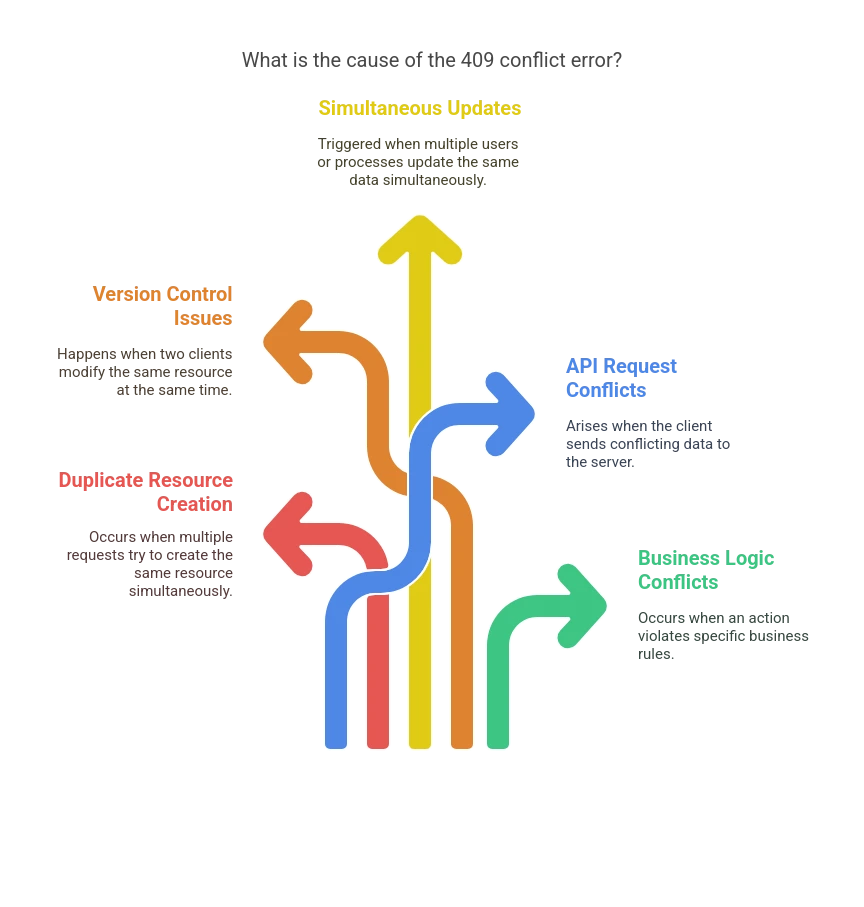
The HTTP 409 conflict error can be triggered by several different factors, most of which involve issues related to resource conflicts. Understanding common causes of HTTP status code 409 is key to fixing the problem. Here are some of the most common reasons behind the HTTP 409 conflict:
1. Duplicate Resource Creation
The most common cause of the 409 conflict error occurs when multiple requests try to create the same resource simultaneously. For example, suppose two users attempt to create a new account with the same email address or username. In that case, the server may not know how to handle the duplication and will return a 409 error code. This often happens in APIs where clients are sending requests to create resources like user accounts, product listings, or blog posts.
2. Version Control Issues
In systems that rely on version control, like databases or file storage systems, a 409 error can occur when two clients try to modify the same resource at the same time, and neither can determine which change should take precedence. Let’s understand that, with an example, in a document management system, two users may try to edit the same document simultaneously, leading to a 409 conflict error. In such cases, the server detects a conflict between the versions and cannot resolve it automatically.
3. Simultaneous Updates
If two or more users or processes attempt to update the same data simultaneously, the 409 conflict error can be triggered. For instance, in a database, two users might try to update the same record, such as modifying the price of a product, at the same time. Since the server can’t determine which update should take precedence, it will return a 409 conflict error. This is particularly common in high-traffic applications or when handling multiple user interactions at once.
4. API Request Conflicts
When using APIs to interact with web services, a 409 error code can occur if the client sends conflicting data. For instance, if one request tries to modify a resource that another user has already changed, the server may reject the request with a 409 conflict error to prevent data loss or corruption. This can happen when the client’s request is outdated or if the data being sent no longer matches the state of the resource on the server.
5. Business Logic Conflicts
Sometimes, a 409 conflict error occurs due to business rules or validation checks that prevent specific actions. For example, suppose a user tries to perform an action that violates specific business logic (such as withdrawing more funds than are available in an account). In that case, the server might return a 409 error code to indicate that the request conflicts with the current state of the system.
Identify and Resolve 409 Conflicts to Boost Your Website’s Functionality and User Satisfaction!
How to Fix HTTP 409 Error Code
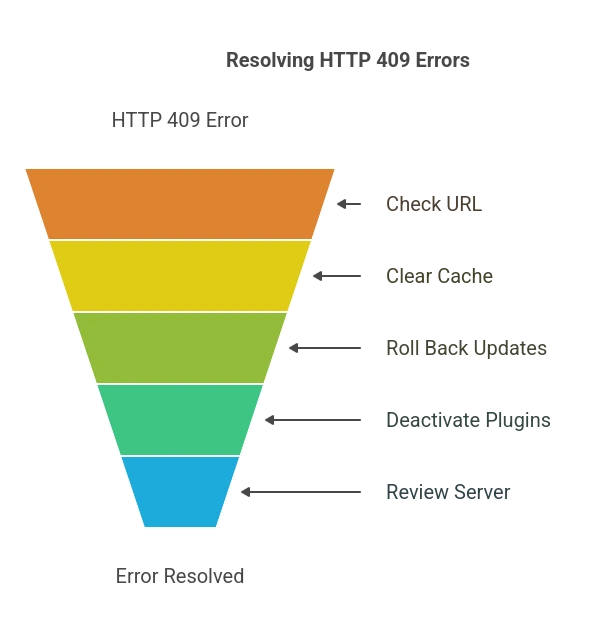
Once you know about the cause of the 409 error, there are several ways to fix the HTTP 409 error. Possible solutions are below.
1. Check the Requested URL
As mentioned above, the 409 conflict error can arise from incorrect information in a PUT request. So, when updating a resource, you will want to ensure that you entered its destination correctly.
It is a good idea to review the requested URL. Sometimes, you may have to enter the URL on your own, so check it is spelled correctly. You might get the Status Code 409 when the web address is incorrect.
Check for typos and then refresh the page. Sometimes, doing this helps, as the old errors disappear given enough time. This is one of the effective ways for 409 conflict error resolution and can also contribute to better website speed optimization, since cleaner requests reduce unnecessary server load.
2. Clear Browser Cache
When you view the website for the first time, the browser stores the page’s data in the cache. Then, when you again visit the website, the browser pulls the information from the cached data rather than sending new requests.
So, even if you have fixed the resources in your cache, the 409 conflict might still load. The error message displays because of the browser cache. In this scenario, you may need to clear your browser’s cache to remove the HTTPS status code.
However, each browser has its pathway; for example, on Google Chrome, you need to click on the three-dot icon at the top-right corner of the page. Then select Clear Browsing Data > Cached Images and Files.
After you have cleared the data, try the request again to see if the 409 error has been resolved.
3. Roll Back Onsite Updates
If you have made some recent updates to your website, these updates may be the culprit for the 409 conflict. For troubleshooting 409 error code, consider rolling back the updates. This downgrade can help you evaluate whether the core software conflicted with other tools on your site.
However, before you roll back the updates, backup your website. If you do not, you are at risk of losing the essential changes you made to the new software update. After troubleshooting the issue, you can restore your site to its former state.
4. Uninstall/Deactivate Plugins
If you do not want to downgrade your website completely, you can uninstall or deactivate the plugins. Deleting the software will help in resolving 409 conflicts in web applications. If you use WordPress, to deactivate the plugins, go to the Plugins page on the dashboard and select all your plugins.
Now, choose the Bulk actions menu and select the Deactivate option. To finalize these changes, hit Apply.
Try the request again to see if you receive the HTTP 409 error. If the request is successful, you know there was a conflict with one of the plugins.
However, if you want to know which plugin was causing the issue, activate each plugin one at a time. After each activation, check to see the error.
5. Review the Server for Configuration
If none of the above works for 409 conflict error resolution, you can review your server for configuration. It helps identify resource access or version control conflicts that may be causing the 409 status code.
However, you have to check settings related to file permissions, locking mechanisms, and resource versioning.
Web server configuration files might contain settings that restrict access to certain resources or define how file updates are handled.
Database configuration (like MySQL’s my.cnf or PostgreSQL’s postgresql.conf) may have settings related to data concurrency control, which can help prevent conflicts when multiple users try to modify the same data simultaneously.
Are you using a version control system like Git? It can also be a source of 409 errors if there are conflicts between different versions of a file. Reviewing the version control history and resolving any merge conflicts can help resolve the issue.
However, fixing this can be complex for some. In that case, we suggest using our web development services.
Does a 409 Error Code Affect SEO?
Yes, a 409 Conflict status code can have a negative impact on SEO if it occurs frequently. When a 409 error occurs, it means that the client was not able to successfully create or update a resource due to a conflict with the current state of the resource. This can result in broken links, missing or incorrect information, or other issues that can negatively impact the user experience. If these issues persist, they can lead to a decrease in user engagement and ultimately have a negative impact on SEO.
However, a single occurrence of a 409 error is unlikely to have a significant impact on SEO. Search engines are designed to handle errors and can typically still crawl and index a website even if some resources are temporarily unavailable.
Search engines like Google use URL indexers to crawl and catalog your website, and although occasional 409 errors may not halt the crawling process, recurring errors can confuse the indexer and prevent proper indexing of pages. This can lead to search engines not properly indexing important resources, affecting rankings and visibility.
Thus, website owners and developers need to address and fix any recurring 409 errors to ensure that their website or web application remains accessible and usable for both users and search engines.
How to Minimize the SEO Impact of a 409 Error?
Preventing HTTP 409 conflict errors is essential for maintaining a smooth user experience and ensuring that applications function correctly. By implementing best practices in API design, database management, and concurrency control, you can reduce the chances of encountering 409 errors. Here are some effective strategies to prevent these conflicts:
Monitor and Fix Conflicts Promptly: Use tools like Google Search Console and server logs to track 409 errors and resolve them quickly.
Implement Proper Redirects (If Necessary): If a page consistently triggers 409 conflicts, consider using 301 or 302 redirects to guide users to a functional page.
Ensure API and Form Handling Work correctly: If the 409 error is caused by form submissions, duplicate requests, or API conflicts, fix the issue to maintain a smooth user experience.
Provide Clear User Instructions: Display user-friendly error messages so visitors know how to resolve the conflict instead of abandoning the site.
Stop Losing Traffic: Let SEO Discovery Handle Your 409 Errors
HTTP 409 errors may seem minor, but when left unresolved, they can quietly damage your website’s performance, frustrate users, and negatively impact your SEO rankings. These errors usually stem from conflicting requests—often caused by duplicate submissions, API misconfigurations, or database constraints—and can quickly snowball into larger technical issues.
SEO Discovery, the best digital marketing agency specialize in identifying and fixing 409 errors to ensure your website runs smoothly and your visitors enjoy a seamless experience. Our team of SEO and technical experts will:
- Conduct a comprehensive audit to identify the root cause of HTTP 409 errors
- Implement solutions tailored to your CMS, API structure, or database logic
- Optimize error handling for better UX and search engine compliance
- Prevent future conflicts with proven best practices and robust coding standards
Don’t let something as avoidable as a 409 error chip away at your search rankings or user trust. With SEO Discovery on your side, you can focus on growing your business while we handle the backend complexities.
Let’s Fix Those 409 Errors—Before They Cost You More Traffic!
FAQs on HTTP 409 Error Code
The HTTP 409 error (409 Conflict) indicates that a request cannot be completed because it conflicts with the current state of the resource on the server.
- Duplicate resource creation (e.g., two users creating the same account).
- Simultaneous updates to the same resource.
- API request conflicts due to outdated client data.
- Business logic violations (e.g., insufficient funds for a transaction).
- Verify the requested URL.
- Clear the browser cache and refresh the page.
- Roll back recent updates.
- Disable conflicting plugins or extensions.
- Check server settings for configuration issues.
Yes, frequent 409 errors can negatively impact SEO by disrupting user experience and causing broken links. It is essential to resolve these errors quickly.
No. A 404 error means the requested resource is not found, whereas a 409 error means there is a conflict preventing the request from being processed.
- Implement proper version control.
- Use concurrency control techniques in databases.
- Handle API requests efficiently to prevent outdated data conflicts.
- Regularly monitor server logs for potential issues.