

Any site, including a simple blog and a huge eCommerce structure, needs to be visible in the search engines to bring traffic. Marketers and other SEO specialists require access to reliable and current data that will enable them to know the effectiveness of a given site as far as search engine results are concerned. These are keyword ranking, organic traffic trend, technical health, and backlink data, which can very soon accumulate when performed manually.
Around 62% of businesses now use analytics dashboards to track SEO KPIs, highlighting how essential automated insights have become
The need to have faster, smarter, and efficient reporting has increased over time resulting in the emergence of automated SEO reporting tools. The tools make it easier by aggregating information across various sources and displaying it in a single point, usually in the form of an adjustable dashboard and scheduled reports. It is less time-consuming, more accurate, and convenient to exchange knowledge with clients or teams.
But there is simply too much to choose: All of them have specific features and differences in prices and degree of customization. Some are built for a SEO agency managing multiple clients, while others are ideal for in-house SEO teams with specific business goals.
In this blog, we will take you through the major aspects that you ought to consider when determining an automated SEO reporting tool that can support your business objectives and reporting requirements.
Key Takeaways
- Manual reporting is outdated—automated tools save time, reduce human error, and ensure consistent delivery of SEO performance data to clients or internal teams.
- Define your business goals, the type of clients you serve (e.g., small businesses, enterprise), and the kind of reports you need (e.g., white-label, PPC, keyword tracking) before evaluating tools.
- The best SEO tools integrate smoothly with platforms like Google Analytics, Search Console, Ahrefs, SEMrush, and PPC tools to consolidate data for complete visibility.
- White-label reporting, branded dashboards, and customizable KPIs allow agencies to maintain professionalism and deliver tailored insights to clients.
Table Of Contents
- The Importance of SEO Reporting in 2025
- Rise of Automation in SEO Tools
- 9 Key Factors to Consider When Choosing an SEO Reporting Tool
- Top 7 Tools to Consider in 2025
- Why SEO Discovery Is the Perfect Partner for Your Reporting and Optimization Needs
- FAQs About How to Choose an Automated SEO Reporting Tool
The Importance of SEO Reporting in 2025
Data-driven decision-making is becoming the world of digital marketing where changes are highly volatile. Since search engine algorithms are getting pretty sophisticated, and the user patterns are changing all the time, SEO specialists cannot afford to dare to rely on his or her intuition anymore. They require actual responses such as figures, drills and knowledge of what is working (and what is not). Enter SEO reporting.
A properly presented SEO report tells the entire story about how your site is doing. It helps companies optimize their strategies by analyzing traffic sources, keyword ranking, backlink profile, technical SEO audit results, and other technical problems. However, in case of manually generated reports they soon turn out to be a time-sucking task instead of a business asset.
Rise of Automation in SEO Tools
Automation is the new standard of SEO and this would help marketers and agencies save time, decrease human error, and add more value. Automated seo reporting tools make the whole reporting process smooth with drawing data collected at various platforms and reformatting it in a single easy-to-grasp form. This does not only enhance the internal working processes but makes communication with the client and stakeholders more constructive.
As more tools are entering the market, you need to select a tool that fits your business objectives and the needs of your clients as well as your reporting intervals. No matter how many sites you have, a proper tool can save you a lot of time.
9 Key Factors to Consider When Choosing an SEO Reporting Tool
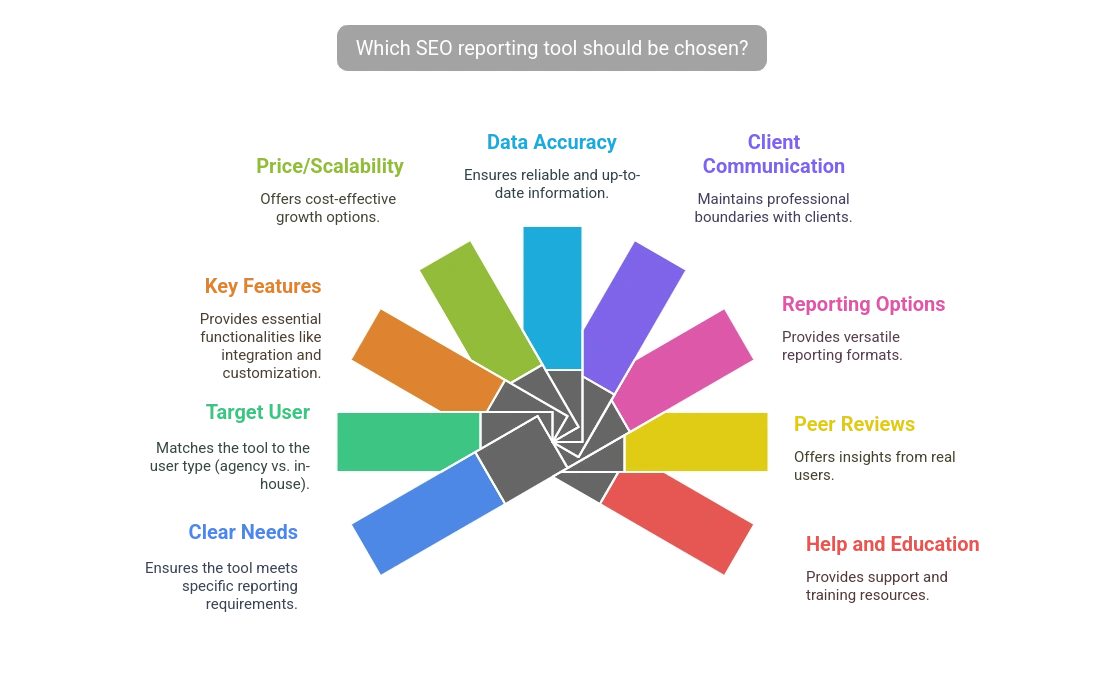
1. Clearing Your Needs
Before buying any software, know what sort of reporting you or your agency requires. Do you have tens of clients to maintain? Do you concentrate on local SEO services, content writing services, or are you running SEO and PPC reporting at the same time?
- Do I require personalized branding on the reports?
- Am I required to set automatic weekly or monthly reports?
- Do I desire Google Analytics, search console or other SEO tools integration?
- Do I require keyword ranking or backlink data down to which level?
This way once you find the answers to them, then the suitable candidate of SEO reporting tools that one can use with their respective agencies or enterprises will be easier to point down.
2. Agency vs in-house Consider the Target User:
The right tool mainly depends upon the kind of user. These SEO reporting tools are special software dealing with agencies having their exclusive needs to work with numerous customers. They tend to integrate multi-account management, white-label reports and custom dashboards on behalf of the clients.
An enterprise SEO reporting tool, on the other hand, is usually applicable to big companies, while SEO for small businesses may require simpler tools with essential features only. with interests to monitor large numbers of websites, subdomains, or perform a sophisticated competitive analysis themselves. Such tools can also include integrations with business intelligence tools such as Tableau or Power BI.
3. Key Features to Look For
It is critical to look for key features Key Features to Look For in the generation technique and in the plasmid.
In making the selection of what is the best automated SEO reports tool, make sure that it has the following fundamental features:
- Integration Capabilities
The tool is to be connected to Google Analytics, Google Search Console, Google Ads, Bing Ads, SEMrush, Ahrefs, Moz, and others. The smoother the integrations are, the fewer accompanying manual labor is needed.
- Customizable Dashboards
You are supposed to be capable of calibrating dashboards with widgets that describe your pertinent KPIs like keyword trend, CTR, bounce rate, technical problems or backlink growth.
- White-label Reports
A high number of agencies offering SEO reporting also have white-label available, as a way to stamp your brand on the reports and supply the client with the report in that form.
- Automation and Scheduling
Select tools that can enable you to initiate reporting on a daily, weekly or monthly basis. This makes it consistent and time saving.
- Management of Users and Access Control
This is especially important to agencies as this feature will enable you to grant access levels to members of a team or the clients.
4. Price/scalability
Their prices are extremely different. A few of these tools are billed per client, some are billed per keyword and some provide unlimited access at a monthly fee. In making a decision, ask yourself:
- Will this program grow with me in business?
- Is it charged with other costs to produce extra reports or integrations?
- Can I upgrade most efficiently as I add more clients on board?
5. Accuracy of Data and Real Time Update
The quality of your reports is equal to the quality of the data under which it is based. See that the tool provides the real-time or near real-time updates. You will also want to see whether they export raw data as well, so you can verify it.
6. Client Communication and Openness
The other famous question several agencies put across is: Will the SEO reporting agencies tools make attempts to reach clients?
The best tools are usually agency-centered and never contact your clients directly. Nonetheless, make sure to check the terms of service or support just to be sure, particularly when white-labeling reports.
7. Sharing and Reporting Options and Formats
- The most useful ones have a variety of features:
- PDF reports
- Email summaries
- Client portal access
- Export on CSV or Google Sheets
This versatility is fundamental to internal teams and customer facing reports alike.
8. Peer recommendations and Reviews
User feedback should not be disregarded. Trustworthy sources should be used to provide SEO reporting tools for agency reviews. Take a look at sites such as G2, Capterra, or TrustRadius and check reviews of real users. Seek answers to usability, customer service, performance and precision.
9. Help and Education
An outstanding tool has outstanding support. Having access to help and getting answers to your questions quickly can save you hours of trial and error in fixing a problem. This can be done with live chats, webinars, or even training libraries.
Top 7 Tools to Consider in 2025
Here’s a brief rundown of the best SEO reporting tools for agencies and enterprises in 2025:
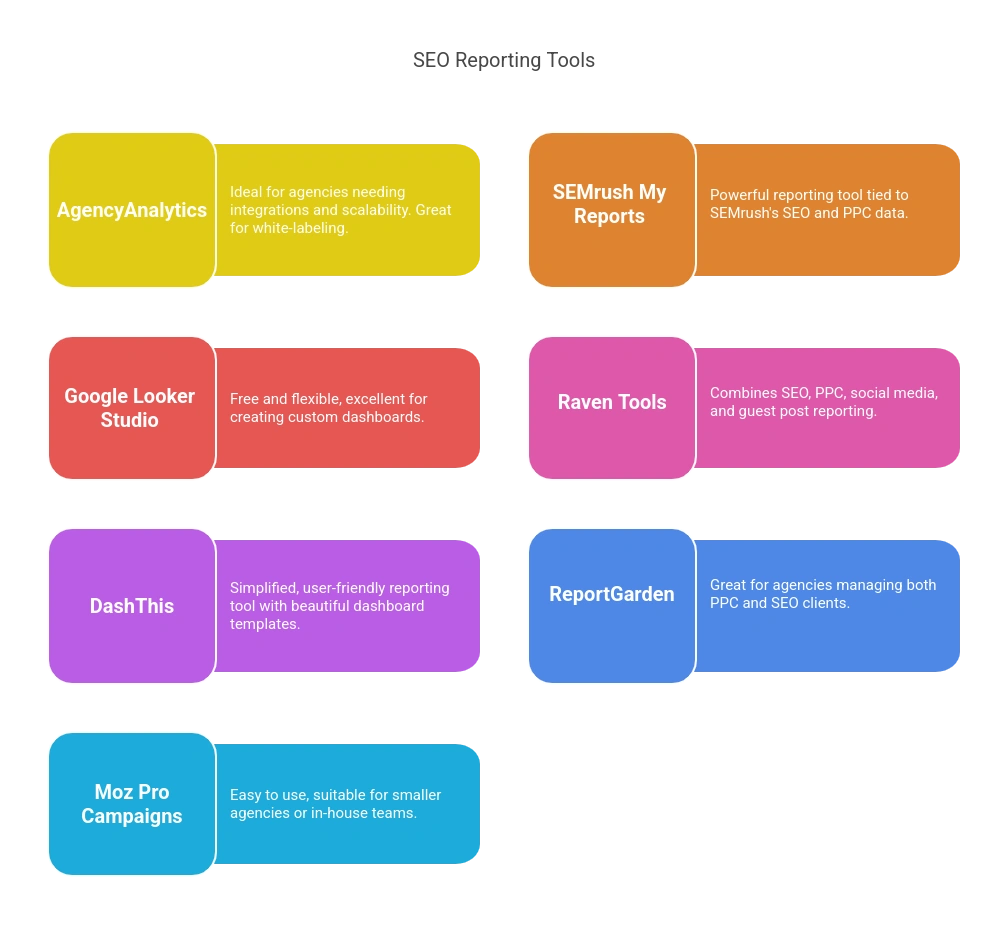
- AgencyAnalytics – Ideal for agencies, with extensive integrations, white-labeling, and scalability.
- SEMrush My Reports – Powerful reporting tied directly to SEMrush’s deep SEO and PPC data.
- Google Looker Studio (formerly Data Studio) – Free, flexible, and excellent for custom dashboards.
- Raven Tools – Combines SEO, PPC, social media marketing, and even guest post reporting to deliver a comprehensive overview.
- DashThis – Simplified, user-friendly reporting tool with beautiful dashboard templates.
- ReportGarden – Great for agencies with a mix of PPC and SEO clients.
- Moz Pro Campaigns – Easy to use and suitable for smaller agencies or in-house teams.
Why SEO Discovery Is the Perfect Partner for Your Reporting and Optimization Needs
Although the tools and automation are essential, it is also important to have a team that is educated on how to perceive and apply data. This is where SEO Discovery enters the picture. As a leading digital marketing agency, SEO Discovery takes an experienced understanding of the industry combined with sophisticated reporting systems and advises you to maximize the potential of your SEO.
Whether you are an agency helping several customers, or a company intending to expand your online presence, SEO Discovery will provide you with a practical approach fueled by strategic thinking and vast experience insight.
Here’s What Sets SEO Discovery Apart:
- Customized Reporting Dashboards tailored to your KPIs and industry goals
- Transparent Communication with clear, actionable insights for every report
- White-Label Reporting options for agencies managing clients under their brand
- Integration with Major Tools like Google Analytics, Search Console, SEMrush, Ahrefs, and more
- Scalable Services that grow with your business—whether you’re handling 1 or 100 campaigns
Want Better SEO Reports Without the Extra Work? Let SEO Discovery Handle it for You with Smart Tools and Expert Support!
FAQs About How to Choose an Automated SEO Reporting Tool
An automated SEO reporting tool collects SEO data from multiple sources such as Google Analytics, Search Console, and keyword tracking tools, and presents it in visual reports. These tools save effort by running and scheduling reports automatically, hence SEO performance becomes easier to analyze and communicate.
Manual SEO reporting is time-consuming and error-prone. Automated software simplifies the process, ensures accuracy, and delivers regular updates. It also simplifies sharing data with clients or teams, eliminating hours of repetitive work each month.
Yes, most of them have flexible pricing and features appropriate for small businesses. Even some tools such as Google Looker Studio are free and very customizable, making them ideal for startups or businesses with a tight budget.
Begin by defining what you need—keyword tracking, backlink checks, white-label reports, client portals, etc. Then search for tools that fit what you’re looking for and integrate with platforms you already use (such as Google Analytics or Ahrefs). Lastly, factor pricing and scalability into your business growth.
Yes, numerous tools like AgencyAnalytics, DashThis, and ReportGarden include white-label capabilities. This enables agencies to incorporate their branding, logo, and custom messaging within reports, with a professional and consistent client experience.
Seek integrations with:
- Google Analytics & Search Console
- SEMrush or Ahrefs
- Google Ads / Bing Ads
- Social media tools (for aggregate reporting)
There are tools that offer updates in real-time or near-real-time, and others that update every day or weekly. If your business requires regular performance checks (e.g., online stores or agencies that manage multiple clients), select a tool with a more frequent update interval.
Yes, Google Looker Studio (previously Data Studio) is an amazing free option. It does full customizability, real-time pulling of data, and dashboard sharing. It’s great for both newbies and advanced individuals as long as it’s properly set up.