

Objective
This backlink audit guide covers 10 warning signs and common link issues. It explains how to check backlink quality, fix problems, and maintain a healthy backlink profile for better SEO.
- Regular backlink audits help you find harmful links before they cause problems.
- Sudden ranking drops may signal backlink issues or other website problems.
- Check anchor text to find repeated keywords that look unnatural.
- Review low-quality backlinks to understand whether they may harm your website.
- Track lost backlinks to find ways to recover valuable links.
- Check competitor backlinks to find new link-building opportunities for your website.
- Audit backlinks regularly to keep your website’s link profile healthy.
Your website needs a backlink audit when organic traffic drops, search rankings decline, spammy links appear, or valuable backlinks disappear. Other warning signs include suspicious anchor text and competitors consistently outranking you. If you notice these issues, it’s time to review your backlink profile and identify potential problems.
Did You Know?
Google identifies automated link creation, excessive link exchanges, and paid links intended to manipulate rankings as link spam. These practices highlight why reviewing your backlinks regularly is important.
A backlink audit helps you evaluate link quality, identify suspicious referring domains, and understand how your backlink profile may affect SEO performance. By reviewing your links and investigating potential issues, you can make informed decisions, address problems where necessary, and maintain a healthier backlink profile over time.
In this backlink audit guide, we’ll explain backlink audits, their benefits, 10 warning signs, and how to conduct a basic audit to improve your website’s link health. So continue reading till the end.
Protect Your Website Rankings with Backlink Audit Services from SEO Discovery at $250/Month
Table Of Contents
- What is a backlink audit, and what does it check?
- How is a backlink audit different from a full SEO audit?
- What are the signs you need a backlink audit?
- Backlink audit checklist for your website
- How to audit backlinks and complete your backlink cleanup
- How often should you audit your backlink profile?
- How SEO Discovery fixed a client’s high link toxicity score
- Keep your backlink profile healthy with SEO Discovery
- FAQs about backlink audits
What is a backlink audit, and what does it check?
A backlink audit is the process of reviewing all the links pointing to your website to understand their quality and relevance. It helps you identify toxic backlinks, compare quality links versus spam links, find lost links, and understand whether your backlink profile supports your SEO efforts or needs improvement.
A backlink audit checks several important areas to help you understand your website’s link health and identify issues that may affect your SEO performance.
- Websites linking to you: Check which websites link to your pages and whether they are relevant to your business and audience.
- Anchor text: Review the words used in backlinks to find unnatural phrases or keywords repeated too often.
- Link quality: Check whether links come from trustworthy, relevant websites or low-quality sources with little value.
- New backlinks: Monitor how quickly your website gains links and investigate sudden increases that may indicate spam or unnatural link-building.
- Lost or broken links: Find backlinks that have disappeared or point to pages that no longer work, and look for ways to recover them.
- Spam and penalty signals: Look for suspicious link patterns, link farms, hacked websites, and any manual action notices in Google Search Console.
“Not every backlink helps your website grow. Some links bring value, while others may signal potential problems. A backlink audit helps you understand the difference. Instead of focusing only on the number of links, review their quality, relevance, and sources to build a stronger backlink profile over time.”
Mandeep Singh Chahal, CEO, SEO Discovery
How is a backlink audit different from a full SEO audit?
A full SEO audit checks your entire website, including technical issues, content, and backlinks. A backlink audit focuses only on links pointing to your site. If you suspect link problems, start with a backlink audit, then check your website for SEO issues with a full audit.
The table below highlights the key differences between a backlink audit and a full SEO audit.
| Factor | Backlink audit | Full SEO audit |
|---|---|---|
| Focus | Off-page links pointing to your site | Technical health, content, and links together |
| What it reviews | Referring domains, anchors, link quality, spam risk | Crawl errors, site speed, on-page content, structure, backlinks |
| Main tools | Search Console, Ahrefs, Semrush, Majestic | Screaming Frog, Search Console, Semrush, Analytics |
| Best time to run | After a drop, spike, penalty, or migration | Quarterly, or during a site rebuild |
| Typical result | Link removal and recovery plan | Sitewide fix list across all SEO areas |
What are the signs you need a backlink audit?
Different types of SEO backlinks can affect your website’s SEO in different ways. If you notice low-quality backlinks, sudden ranking drops, or unusual link patterns, your backlink profile may need attention. Here are 10 warning signs to look for and simple checks you can perform to identify potential issues.
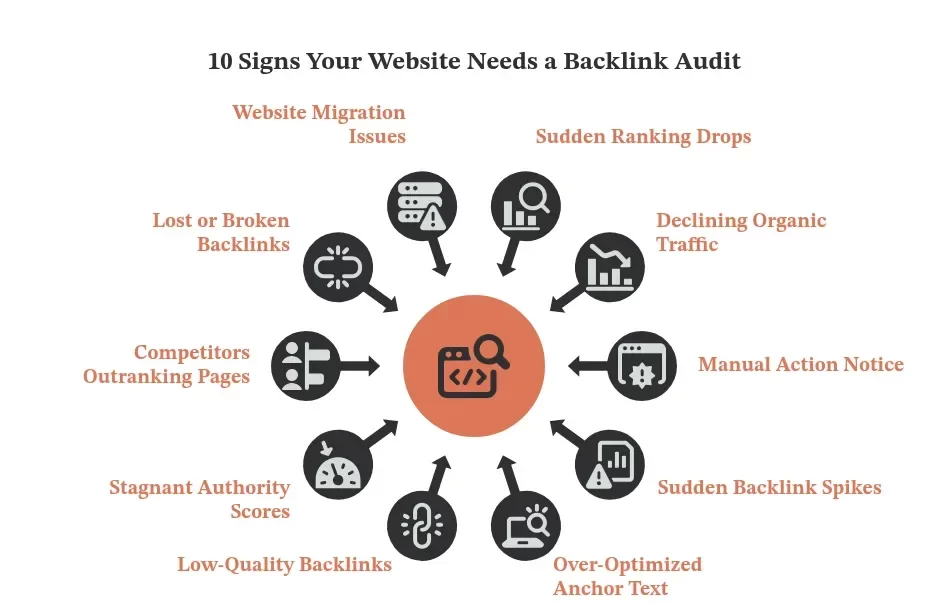
1. Sudden ranking drops
Search rankings can drop when valuable backlinks disappear, or suspicious links appear. However, Google updates, content changes, and technical issues can also affect rankings. If important pages suddenly lose visibility, reviewing your backlink profile can help you identify possible link-related problems.
What to do: Check Google Search Console for ranking drops, then compare the dates with lost backlinks using an SEO tool.
2. Declining organic traffic
A steady drop in organic traffic may indicate SEO problems, including lost backlinks. If your content remains useful but visits continue to fall, check whether important pages have lost links. However, seasonal changes, tracking errors, and technical issues can also cause traffic declines.
What to do: Compare monthly organic traffic with referring domains gained or lost. Also, review landing pages experiencing the biggest traffic declines.
3. Manual action notice
A manual action notice in Google Search Console is a serious warning that Google has found a violation of its spam policies. If the issue involves unnatural links, your website or specific pages may lose search visibility until the problem is addressed.
What to do: Open the Manual Actions report, review Google’s findings, investigate unnatural links, fix the issues, and submit a reconsideration request if needed.
4. Sudden backlink spikes
A sudden increase in backlinks may come from a successful campaign, paid link schemes, or spammy websites. Although rapid growth does not automatically mean a problem, an unusual spike can be a reason to review new links and understand where they came from.
What to do: Use backlink monitoring analysis software to track newly discovered links. Review their relevance, anchor text, and sources to identify suspicious patterns.
5. Over-optimized anchor text
When too many backlinks use the same keyword-rich anchor text, the pattern may appear unnatural. A healthy backlink profile often includes a natural mix of brand names, website URLs, and general phrases. Repeated exact-match keywords from unrelated websites deserve closer attention.
What to do: Review the anchor text report and identify repeated exact-match keywords, especially those coming from unrelated or suspicious websites.
6. Low-quality backlinks
Links from irrelevant or spam-focused websites can indicate problems with your backlink profile. These low-quality backlinks deserve attention when they appear connected to manipulative link-building practices. Reviewing their sources helps you understand whether they require further investigation or action.
What to do: Review suspicious domains manually, check their relevance and link patterns, and consider backlink cleanup when links are part of a manipulative scheme.
7. Stagnant authority scores
When Domain Authority or Domain Rating stops improving, it may be worth reviewing your backlink profile. These scores come from third-party SEO tools, not Google. A flat score alone does not indicate a problem, but lost links or weak link growth may explain the trend.
What to do: Compare monthly referring domains gained and lost. Check whether links come from relevant websites and whether valuable backlinks have disappeared.
8. Competitors outranking pages
If competitors consistently rank higher for important keywords, their backlinks may offer useful clues. They might have links from relevant websites that your site has not earned yet. However, content quality, search intent, and technical SEO can also influence rankings, so backlinks are only one part of the picture.
What to do: Compare backlink profiles with three competitors. Find relevant domains linking to them but not to your website, and identify suitable outreach opportunities.
9. Lost or broken backlinks
Backlinks can stop working when pages are deleted, URLs change, or linking websites remove links. If pages with valuable backlinks return 404 errors, visitors may not reach the intended content. Reviewing these links helps you find recovery opportunities and prevent avoidable link losses.
What to do: Use an SEO tool to learn how to find broken backlinks. Check affected URLs and redirect broken pages to relevant live pages when appropriate.
10. Website migration issues
A website redesign or domain change can break URLs and backlinks if redirects are missing. Old pages may stop working, making it harder for visitors and search engines to reach the correct content. Reviewing backlinks after migration helps you catch broken links and redirect problems early.
What to do: Crawl old URLs with Screaming Frog, check redirects to relevant new pages, fix broken links, and review backlink reports after migration.
Need Expert Backlink Analysis?
We analyze your backlink profile and identify potential risks.
Backlink audit checklist for your website
Use this backlink audit checklist to identify toxic backlinks, assess link quality, spot warning signs, and prioritize issues that need attention on your website.
| S.No | Sign | Where to check | Urgency |
|---|---|---|---|
| 1 | Ranking drop | Search Console performance | High |
| 2 | Traffic decline | Analytics, Search Console | Medium |
| 3 | Manual action notice | Manual actions report | High |
| 4 | Link spike | Referring domains by date | High |
| 5 | Keyword-rich anchors | Anchor text report | Medium |
| 6 | Spammy sources | Referring domains list | High |
| 7 | Flat authority score | Link tool trend lines | Low |
| 8 | Rivals outrank you | Link gap report | Medium |
| 9 | Lost or broken links | Lost and broken link reports | Medium |
| 10 | Redesign or migration | Redirect and crawl reports | High |
How to audit backlinks and complete your backlink cleanup
A basic backlink audit takes five steps. Start with data, find the risks, fix what you can, and then build stronger links. Follow the steps in order, and you will protect your rankings.
Step 1: Export your backlink data
Start by downloading your backlink data from Google Search Console. Then use SEO tools like Ahrefs, Semrush, or Majestic to find more links. Combining data from different tools helps you get a clearer picture of your backlink profile and find backlink-related SEO issues.
Step 2: Check your referring domains
Review the websites linking to your pages. Check whether they are relevant to your business and look for suspicious websites, link farms, or unnatural paid links. An AI backlink analysis agent can help sort large lists of backlinks, but always review suspicious links manually.
Step 3: Find and fix broken backlinks
Some backlinks stop working when pages are deleted or URLs change. Learning how to find broken backlinks helps you identify links pointing to pages that return 404 errors. Redirect these URLs to relevant live pages or contact the linking website to update the link.
Step 4: Clean up harmful links
Start your backlink cleanup by contacting website owners and asking them to remove links that are part of manipulative link-building practices. Keep a record of your requests. Use Google’s disavow tool only when necessary, as using it incorrectly may harm your website’s search performance.
Step 5: Build stronger backlinks
After reviewing your existing links, focus on earning backlinks from relevant and trustworthy websites. Publish useful guides, share original research, and contribute expert insights. Keep tracking new and lost backlinks, and schedule regular audits to maintain a healthy backlink profile.
Need a Backlink Cleanup Plan?
Our experts help prioritize backlink issues and guide your next steps.
How often should you audit your backlink profile?
Regular backlink audits help you spot toxic links, track link changes, and understand how backlinks affect rankings over time. The right schedule depends on your website’s size and link-building activity.
- Every month: If your website builds backlinks regularly or runs active link-building campaigns.
- Every 3 months: If your website earns backlinks at a steady pace.
- After a traffic or ranking drop: To check whether lost or suspicious backlinks may be related.
- After a website migration: To find broken links, missing redirects, and backlink issues.
- After a sudden backlink spike: To review unusual link growth and investigate suspicious sources.
How SEO Discovery fixed a client’s high link toxicity score
One of our clients had a serious backlink problem. Their website had many spammy links, and the toxicity score was very high. They were also losing existing backlinks, which could affect their search rankings and future link-building efforts.
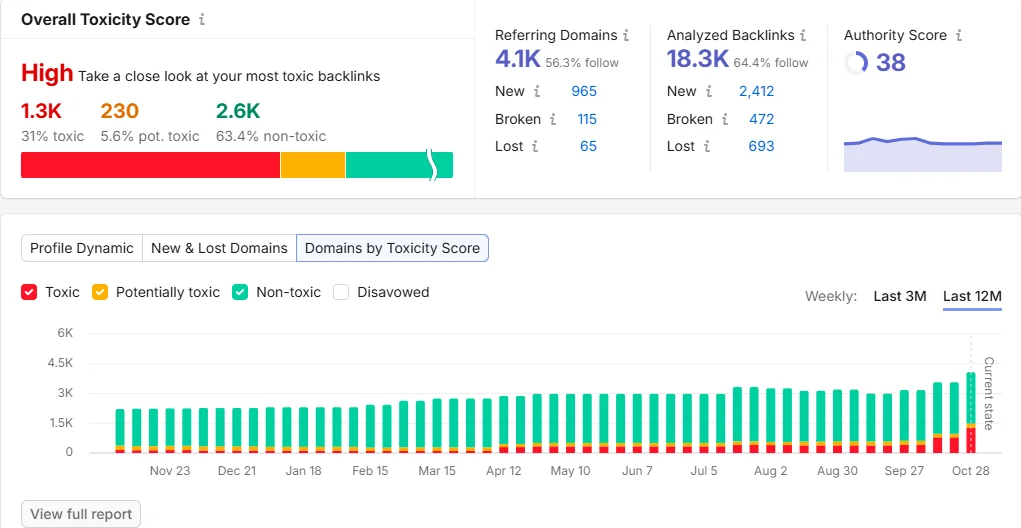
We started by checking the client’s backlinks using fresh data from Semrush. Our team reviewed the risky websites, identified harmful links, and added confirmed spam sources to the disavow file. We then checked new backlinks every week to catch spam early and protect valuable links.
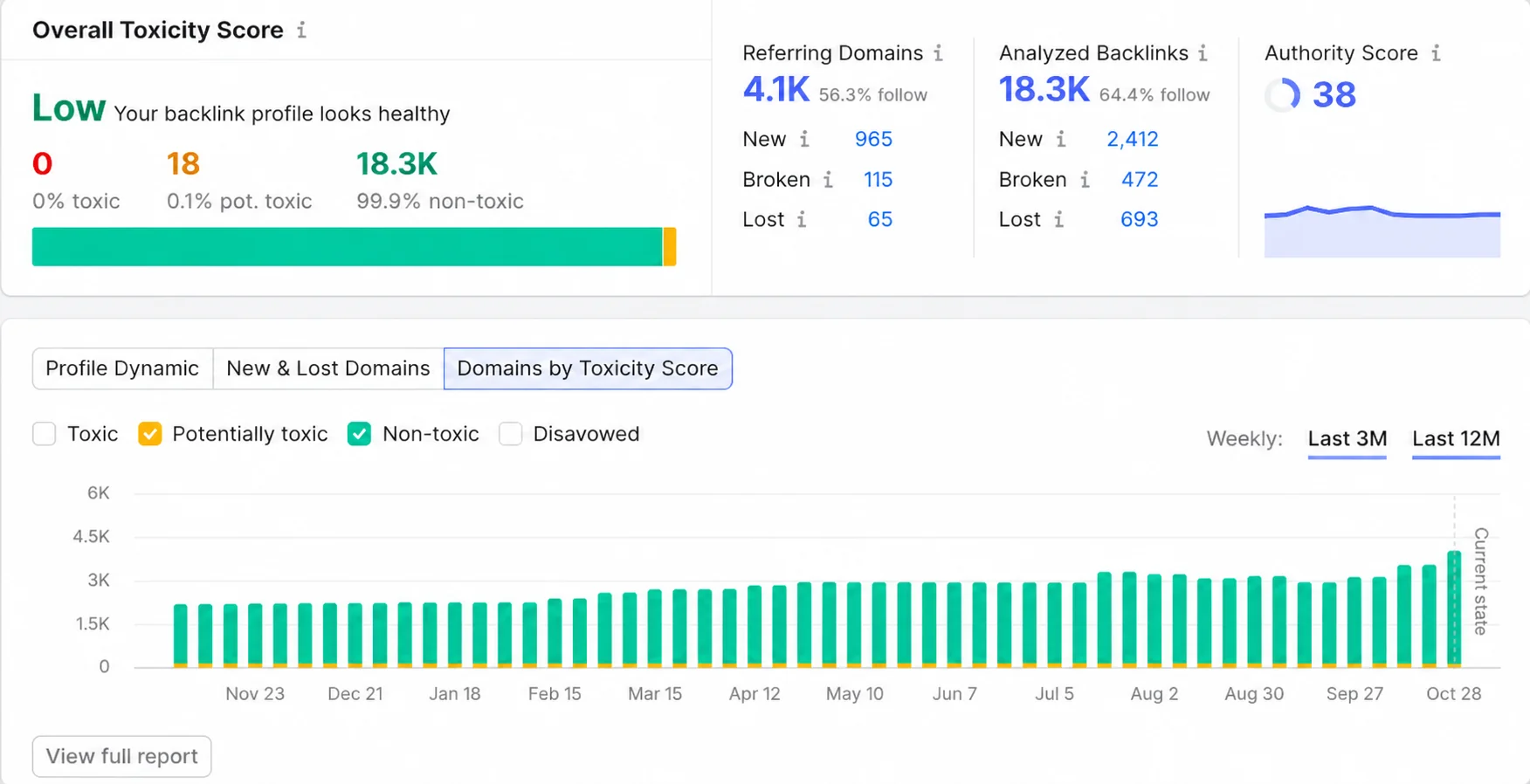
Results:
- The overall toxicity score improved from high to low.
- Toxic domains dropped from 1.3K (31% of the profile) to zero.
- Potentially toxic links fell to just 0.1%, with only 18 flagged.
- Non-toxic links increased from 63.4% to 99.9%.
- The Authority Score remained at 38, and referring domains stayed at 4.1K, helping preserve the website’s existing authority.
Keep your backlink profile healthy with SEO Discovery
A backlink audit helps you identify toxic links, review link quality, recover lost backlinks, and address potential SEO issues. This backlink audit guide covered 10 warning signs, a practical checklist, and steps to audit your backlinks. Regular reviews help maintain a healthier link profile and support long-term SEO performance.
SEO Discovery brings over 22 years of digital marketing experience and a team of 400+ in-house experts to help businesses strengthen their online presence. As a digital marketing agency, it uses research-driven strategies to identify SEO opportunities, improve search visibility, and support sustainable business growth.
Contact us today to discuss your SEO goals and build a healthier backlink profile that supports your website’s long-term growth.
Need Expert Help With Backlinks?
Our team helps you make smarter backlink decisions.
FAQs about backlink audits
A backlink audit reviews the links pointing to your website. It helps you check link quality, find toxic backlinks, identify lost links, and understand whether your backlink profile needs attention.
Collect backlink data from Google Search Console and an SEO tool. Review linking websites, anchor text, and link quality. Investigate suspicious links, fix broken URLs, and plan backlink cleanup where needed.
Log in to Semrush and create or open your website project. Find the Backlink Audit tool, configure your domain, and launch the audit to review your backlinks for suspicious patterns.
Connecting Google Analytics helps you see how much referral traffic comes from linking websites. This information helps you identify backlinks that bring visitors and avoid removing valuable links without proper review.
Use an SEO tool to find backlinks pointing to deleted pages or URLs that return errors. Restore useful pages, add relevant redirects, or contact website owners to update the links.
Toxic backlinks are links that show signs of spam or manipulative link-building. Review their sources and context before taking action. An AI backlink analysis agent can help prioritize suspicious links for manual review.
Check the Manual Actions report to understand Google’s concerns. If unnatural links are involved, investigate them, request removal where possible, and submit a reconsideration request after addressing the reported issues.
Review your backlink profile monthly if you build links regularly. Otherwise, quarterly checks may be enough. Audit sooner after traffic drops, unusual backlink spikes, or website migrations to identify potential issues.