

Objective
This blog aims to explain duplicate content in SEO, its causes and impact, and provide step-by-step solutions to fix and prevent it for better rankings, visibility, and website performance.
- Duplicate content in SEO can negatively affect rankings, visibility, and overall website performance.
- Canonical tags indicate the preferred page version to search engines clearly.
- 301 redirects effectively consolidate duplicate pages into one authoritative URL.
- Noindex tags are used to keep low-value or duplicate pages out of search results.
- SEO tools help to detect duplicate URLs, missing tags, and indexing issues
- Regular SEO audits will keep your site clean, optimized, and duplicate-free.
Improve Rankings Fast by Fixing Duplicate Content Issues with Experts from SEO Discovery, Starting at $250/month
Duplicate content can confuse search engines and reduce your website’s visibility. Fix it by using 301 redirects, rel=canonical tags, or noindex where needed. Start with a website audit in Google Search Console to identify duplicate URLs and direct search engines to the preferred original version.
Did You Know?
Google recommends using canonical tags to tell search engines which page is the main version to index and rank.
Use tools such as Google Search Console, Screaming Frog, Semrush, or Ahrefs to detect and resolve duplicate content. They are useful for identifying duplicate URLs, missing canonical tags, and indexing issues. Fixing duplicate content increases crawl efficiency, retains page authority, and encourages improved search rankings.
In this guide, you’ll learn what duplicate content is, the common causes behind it, how it affects your SEO, and the best ways to fix it. You’ll also know the practical tips to prevent duplicate content issues, so keep reading until the end.
Table Of Contents
- What is duplicate content and its types?
- Why is having duplicate content an issue for SEO?
- Common causes of duplicate content
- How to identify a duplicate content issue?
- How to fix duplicate content (step-by-step)?
- Advanced Tips for Duplicate Content Fix
- How to fix duplicate content on popular platforms?
- How we fixed duplicate content for a client
- Fix duplicate content issues with SEO Discovery
- FAQs about how to fix duplicate content issues
What is duplicate content and its types?
Duplicate content refers to blocks of text or other content that appear in more than one location on the internet. This can occur within a single website or across multiple websites. When search engines encounter duplicate content, it creates confusion about which version should be indexed and ranked. This can negatively impact your website’s visibility in search results.
There are two primary types of duplicate content:
Type | Meaning | Example |
Internal Duplicate Content | Same or similar content exists on multiple pages of the same website | Product pages with different URL parameters or session IDs |
External Duplicate Content | Same content appears on different websites | Blog copied or syndicated on another site without changes |
Why is having duplicate content an issue for SEO?

While Google doesn’t impose direct penalties for duplicate content, it can significantly hinder your site’s ability to perform well in search engine rankings. The real issue lies in how search engines process and prioritize content when faced with duplicates.
Here’s why duplicate content can be harmful to your SEO efforts:
Search engines struggle to determine which version to rank
When multiple pages contain the same or very similar content, search engines have to choose which one to show in search results, and there’s no guarantee they’ll pick your preferred version.
Page authority becomes diluted
Instead of one authoritative page consolidating all its ranking signals, duplicate versions split the value across multiple URLs, weakening their overall SEO strength.
Backlink equity gets divided
If other websites link to different versions of the same content, the SEO value of those backlinks is scattered, reducing the overall impact that a single, consolidated page would receive.
Crawling and indexing inefficiencies
Search engine bots have limited resources (crawl budgets). Duplicate content wastes those resources, which can prevent search engines from discovering and indexing more important or unique pages.
User experience can suffer
Visitors may encounter different versions of the same content across your site (or across multiple sites), leading to confusion, frustration, or a lack of trust, all of which can reduce engagement and conversions.
For all these reasons, addressing duplicate content should be a priority in any comprehensive SEO strategy. Taking the time to identify and fix duplicate issues can lead to better rankings, stronger authority, and a smoother user experience.
Common causes of duplicate content
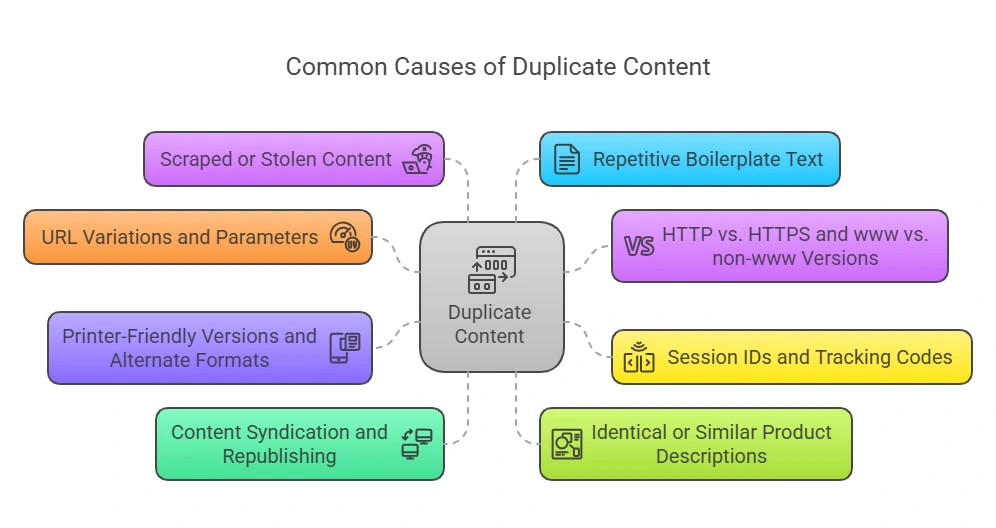
Duplicate content often sneaks into websites unintentionally, but its effects can be significant. Whether you’re managing an ecommerce store or a large corporate site, knowing how duplicate content arises is essential for maintaining SEO health.
Below are some of the most common causes and how they impact your site:
1. URL variations and parameters
A single piece of content can be accessible through multiple URLs due to tracking parameters, search filters, or sort options (e.g., ?sort=price or ?utm_source=email). Even though the displayed content is identical, search engines treat each URL as a separate page, leading to duplication.
2. HTTP vs. HTTPS and www vs. non-www versions
If your website can be accessed through different protocols or subdomain variations, such as http://example.com, https://example.com, http://www.example.com, and https://www.example.com, without redirects or canonical tags in place, search engines may index all of them independently. This leads to identical content appearing on multiple versions of your site.
3. Session IDs and tracking codes in URLs
Some websites add session IDs or tracking codes to URLs to track user activity. This can make the same page appear under multiple URLs, confusing search engines and creating SEO issues.
4. Printer-friendly versions and alternate formats
Offering alternate formats such as print-friendly or mobile-specific versions of your content is great for users, but if these versions live on separate URLs and aren’t properly canonicalized, they may compete with the original page in search results.
5. Content syndication and republishing
Sharing your content on partner sites, industry platforms, or guest blogs without the proper use of canonical tags or “rel=canonical” links can lead to external duplication. In worst cases, the syndicated content might outrank your original version if search engines index it first.
6. Identical or similar product descriptions
Ecommerce sites often reuse manufacturer descriptions across multiple product listings. This practice, while convenient, results in hundreds of product pages with little or no unique content, especially problematic when other sites use the same boilerplate descriptions.
7. Scraped or stolen content
Some websites or bots may copy your content and republish it without permission. This can lead to duplicate content appearing across the web, which may outrank your site if those copies get indexed or linked to first.
8. Repetitive boilerplate text across pages
Standardized legal disclaimers, shipping policies, or return information repeated on every page can trigger duplication issues. While necessary, these should be structured in a way that minimizes SEO impact, for example, by placing them in separate linked pages or in non-indexed areas.
How to identify a duplicate content issue?
Before you can fix duplicate content issues, you first need to find them. Identifying duplicates, both internal and external, is a crucial first step in protecting your site’s SEO performance. Fortunately, there are several reliable methods and tools to help you uncover duplicate content quickly and efficiently.
Method | Tools / Technique | What It Does |
Website Crawlers | Screaming Frog SEO Spider | Scans your site structure and automatically flags duplicate page titles, meta descriptions, and body content. |
Dedicated Site Audits | Semrush / Ahrefs | Crawls your full website to detect technical duplicate issues like pagination, faceted navigation, and near-duplicate pages. |
Internal Scanners | Siteliner | Quickly scans your domain for duplicate content percentage, broken links, and overlapping text. |
Search Engine Diagnostics | Google Search Console | Identifies duplicate URLs and indexing issues detected by Google during crawling. |
Manual Search Checks | Google Search (Quotes Method) | Copy a 10–15-word unique sentence and search it in quotes to find duplicate copies online. |
Plagiarism Checkers | Copyscape / Copyleaks | Detects external duplication by finding scraped or copied content across the web. |
Struggling With Duplicate Content?
Our experts resolve duplicate content issues and improve SEO performance.
How to fix duplicate content (step-by-step)?
Below are the steps to fix duplicate content issues and improve rankings by resolving duplicate content in SEO effectively.
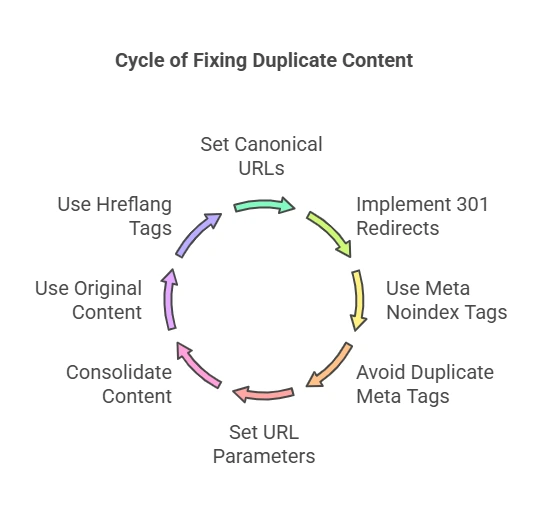
Step 1: Implement canonical tags
Canonical tags tell search engines which page is the original version when similar pages exist. They help avoid confusion, consolidate ranking signals, and ensure the correct page is indexed instead of duplicate versions competing in search results.
Start by doing this
- Add the rel=canonical tag inside the HTML head section of each duplicate page.
- Point all similar or duplicate URLs toward one preferred original page version.
- Ensure CMS automatically assigns the correct canonical URL across similar page variations.
- Validate implementation using Screaming Frog SEO Spider or Google Search Console.
Step 2: Set up 301 redirects
301 redirects permanently send users and search engines from duplicate pages to a single correct page. This helps maintain SEO value, prevents ranking dilution, and resolves duplicate URL issues across different versions of the same content.
Here’s how you can implement it
- Configure redirects through the hosting control panel or server-side configuration settings properly.
- Map all duplicate URLs to one primary destination page for consolidation.
- Use the .htaccess file or server rules for permanent redirect implementation setup.
- Test all redirect paths using SEO auditing tools like Semrush or Screaming Frog.
Step 3: Add noindex tags for low-value pages
Noindex tags instruct search engines not to include certain pages in search results. They help reduce indexing of thin, unnecessary, or duplicate pages, improving overall website quality and preventing SEO issues caused by duplicate content.
Follow these steps to apply it
- Add the noindex meta robots tag inside the HTML head section of specific pages.
- Apply noindex settings through CMS tools or SEO plugins like Yoast SEO.
- Exclude tag pages, filters, archives, and thin content pages from indexing.
- Verify removal status using Google Search Console indexing coverage reports regularly.
Step 4: Merge similar content
Merging similar pages combines overlapping content into one strong and authoritative page. It improves SEO duplicate content issues, improves keyword relevance, and strengthens overall page performance by consolidating ranking signals into a single optimized resource.
Let’s break down how to do it
- Identify pages targeting identical or highly similar keywords using SEO tools.
- Combine overlapping content into one comprehensive, well-structured, detailed page version.
- Improve readability, flow, and depth while merging multiple similar content pieces.
- Redirect old URLs to the newly created consolidated master page for consistency.
Step 5: Standardize URL versions
Standardized URLs ensure only one version of a page is accessible and indexed. This prevents duplicate versions caused by www, non-www, HTTP, and HTTPS variations, which often split SEO value and confuse search engines.
You can fix it like this
- Choose the preferred domain version, such as ‘www’ or ‘non-www’, and stick to it consistently.
- Force HTTPS across the entire website using server-level redirect configuration settings properly.
- Update all internal links to match the selected canonical URL structure consistently
- Set the preferred domain version inside the Google Search Console configuration settings.
Step 6: Fix URL parameters & faceted navigation
URL parameters often create multiple duplicate versions of the same page automatically. Fixing them ensures search engines only crawl and index clean URLs, improving site structure and preventing unnecessary duplication issues across dynamic pages.
Here’s what you need to do
- Identify parameter-based URLs using SEO crawling tools like Screaming Frog SEO Spider.
- Block unnecessary parameters using robots.txt file or CMS configuration settings properly.
- Apply canonical tags to filtered, sorted, or faceted navigation pages correctly.
- Configure URL parameter handling inside Google Search Console settings for control.
Step 7: Fix internal linking
Internal linking helps search engines understand the correct version of each page. If links point to duplicates, it creates confusion, weakens authority distribution, and contributes to duplicate content issues across your website structure.
Follow this process to fix it
- Audit all internal links using SEO crawling tools to identify duplicate references.
- Replace links pointing to duplicate pages with canonical or preferred URL versions.
- Maintain consistent anchor text usage across all internal linking structures for clarity.
- Fix broken or outdated internal links immediately to improve site health.
Step 8: Clean and submit XML sitemap
A clean XML sitemap ensures search engines only crawl important and correct pages. It prevents indexing of duplicate URLs, improves crawl efficiency, and helps search engines understand your website structure more accurately.
Here’s the right way to do it
- Remove duplicate URLs and redirected pages from the XML sitemap file completely.
- Include only canonical, indexable, and high-quality pages inside the sitemap structure.
- Submit the updated XML sitemap through Google Search Console for reprocessing.
- Monitor crawl errors and indexing issues after submission regularly for accuracy.
Step 9: Use Hreflang tags (multilingual pages)
Hreflang tags guide search engines to show the correct language or regional versions of a page. They prevent duplicate content issues across multilingual websites and ensure users see the most relevant version based on location.
- Add hreflang attributes inside the page head or XML sitemap for all versions
- Link each language or regional page to its alternate versions correctly
- Use the correct ISO language and country codes for proper search engine understanding
- Validate hreflang implementation using SEO audit tools like Ahrefs or Semrush
Advanced tips to fix duplicate content issues
Below are the tips for fixing duplicate content issues.
- Implement structured data markup: Help search engines understand your content with Schema markup. It doesn’t prevent duplication, but it improves content classification.
- Set canonical versions in your CMS: Use your platform settings (like Shopify, WordPress, or Magento) to ensure it always uses the correct URL format and canonical tags.
- Monitor regularly: Duplicate content isn’t a one-time fix. Schedule regular SEO audits to ensure you’re not unknowingly creating new duplicates.
How to fix duplicate content on popular platforms?

Fix duplicate content issues across platforms using proper canonical setups and SEO settings to maintain clean indexing and better rankings.
Below is a table explaining different platforms
Platform | Tips to Fix Duplicate Content Issue |
WordPress | Use SEO plugins like Yoast SEO or Rank Math to set canonical tags. Correctly configure your homepage and blog page. Turn off tag archives if you don’t use them. |
Shopify | Prevent duplicate product pages by customizing your theme code. Ensure each product page has a proper canonical URL. |
Wix / Squarespace | Make sure canonical tags are automatically generated correctly. Avoid copying the same blog content across multiple pages. |
How we fixed duplicate content for a client
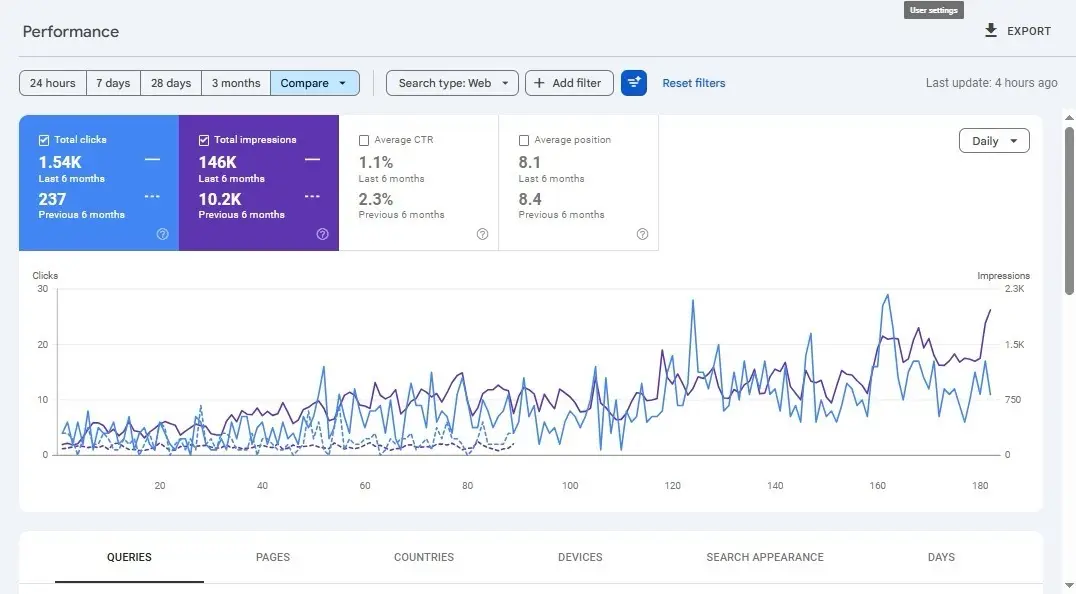
We helped one of our clients who was struggling with a severe duplicate content issue across their website. Crawl inefficiencies were splitting ranking signals, suppressing key pages from Google’s index, and causing a steady decline in organic impressions and overall search visibility.
Our team ran a full technical audit to identify all duplicate URLs, parameter-driven pages, and canonicalization gaps. We implemented canonical tags, set up 301 redirects, and cleaned up URL parameters through Google Search Console as part of our technical SEO services.
The results
- Total clicks grew to 1.54K, up from 237 in the previous 6 months
- Total impressions jumped to 146K compared to 10.2K previously
- Average position strengthened to 8.1 from 8.4 in the previous 6 months
- Consistent upward trend visible in both clicks and impressions over 180 days
Fix duplicate content issues with SEO Discovery
Fixing duplicate content in SEO is essential to improve rankings, avoid keyword cannibalization, and ensure search engines index the right pages. It helps strengthen authority, improve crawl efficiency, and deliver a better user experience across your website.
SEO Discovery offers expert solutions through the best SEO services to identify and fix duplicate content issues effectively. Their strategies ensure higher visibility, improved rankings, and long-term SEO performance for your business growth.
Contact us today to resolve duplicate content issues and boost your website performance with expert SEO support.
Want Better Website Performance?
Our experts optimize your website for better search visibility.
FAQs about how to fix duplicate content issues
Duplicate content refers to identical or very similar content appearing on multiple URLs, either within the same site or across different domains. It matters because search engines may struggle to decide which version to rank, potentially diluting your page authority and hurting your SEO efforts.
Google doesn’t usually issue a manual penalty for duplicate content unless it’s clearly manipulative. However, having duplicate content can still negatively affect your rankings, traffic, and visibility, which makes fixing it essential.
You can use tools like Siteliner, Copyscape, or Screaming Frog to detect duplicate pages, titles, meta descriptions, or blocks of content. Google Search Console and search operators can also help you identify content that’s indexed multiple times or copied elsewhere.
A canonical tag is a small snippet of HTML code that tells search engines which version of a URL should be considered the “main” or “original” version. It helps consolidate ranking signals and avoids confusion when similar or duplicate pages exist.
Yes, 301 redirects are an effective way to permanently point duplicate pages to the preferred version. It ensures users and search engines are sent to the correct URL and helps consolidate SEO value.
Internal duplicate content happens within your own site, such as when the same product appears under multiple URLs. External duplication happens when your content is copied or syndicated across different domains without proper canonicalization or attribution.
Avoid using manufacturer descriptions word-for-word and create unique product descriptions whenever possible. Also, use canonical tags, manage URL parameters, and configure your site to prevent sorting/filtering options from creating new URLs unnecessarily.
It’s fine to republish content if done properly. Always use the rel=”canonical” tag pointing to your original post, or request the republishing site to add it. Alternatively, you can rewrite or summarize the content to keep it unique.
Yes, it can. Search engine bots have limited time and resources to crawl your site. Duplicate pages waste that crawl budget, potentially preventing your important or fresh content from getting indexed efficiently.
It’s a good practice to audit your site at least quarterly. If you run a content-heavy or ecommerce site, more frequent checks may be necessary to catch duplication early before it affects your rankings.