

Have you ever searched for your website on Google and couldn’t find it? You’re not alone. Many website owners face the same issue. You put in all the hard work—building your website, adding content, maybe even sharing it on social media—but when it comes to showing up on Google, it feels like your site just doesn’t exist.
The truth is, just creating a website isn’t enough. If your site doesn’t show up on Google, people won’t know it’s there. And that means you could be losing visitors, customers, and opportunities every single day. But don’t worry—getting your website to appear on Google isn’t as hard as it seems. With the right steps (and possibly some help from the best SEO company), anyone can do it.
Did You Know? Over 90% of all web traffic goes to websites listed on the first page of Google search results.
In this blog, we’ll show you how to make your website appear on Google Search. Step by step, in simple terms. Whether you’re new to websites or just want better results, this guide will help you get noticed online.
Table of Contents
- Why Does Google Matter for Your Website?
- Why Is My Website Not Showing Up on Google?
- How to Make My Website Appear on Google Search
- Related Issues: Why Is My Page Missing from Google Search?
- More Ways to Improve Visibility on Google
- How to Get Your Website Ranking #1 on Google with SEO Discovery
- FAQs on How to Make My Website Appear on Google Search
Why Does Google Matter for Your Website?
Google is the most popular search engine in the world. When people have questions, need products, or want information—they Google it. If your website doesn’t appear in those results, you’re missing potential traffic, leads, and sales. So understanding how to make my website appear on Google Search is key to online success..
Why Is My Website Not Showing Up on Google?

If you’ve ever asked, “Why is my website not showing up on Google?” or “Why does my website not show up on Google?”, there could be a few reasons behind it:
1. Your site is new and hasn’t been indexed yet
If your website is newly launched, Google might not have had enough time to discover, crawl, and index your pages. It can take several days or even weeks for a new site to appear in search results, especially if you haven’t submitted your site to Google Search Console or created a sitemap.
2. Google can’t find your pages (crawl errors)
Sometimes, technical issues like broken links, server errors, or incorrect URL structures can prevent Google from accessing your pages. Crawl errors in Google Search Console can provide insights into why your site isn’t being indexed properly.
3. Your site has blocked pages with robots.txt
The robots.txt file tells search engine crawlers which parts of your site to ignore. If this file is misconfigured, it may block important pages or even your entire site from being indexed by Google.
4. No quality backlinks or SEO work has been done
Google relies on backlinks from other reputable websites as a signal of trust and relevance. Without backlinks or basic SEO practices like keyword optimization, metadata, and proper site structure, your site may struggle to appear in search results. Consider using Guest Post Services and On page SEO services to improve visibility and authority.
5. Content is too thin or not optimized for search
If your content lacks depth, originality, or relevance to user queries, it may not meet Google’s quality standards. Well-optimized content that provides real value to users, uses relevant keywords, and follows SEO best practices is more likely to be indexed and ranked.
Ready to Get Your Website Found on Google? Let Our SEO Experts Take the Guesswork Out!
How to Make My Website Appear on Google Search
Here’s your step-by-step guide to help your site show up on Google:
1. Submit Your Website to Google
If your site is new, Google may not know it exists. You need to tell Google about it.
- Go to Google Search Console
- Add your website and verify ownership
- Submit your sitemap (usually at yourdomain.com/sitemap.xml)
This helps Google crawl your website and index your pages.
2. Check If Google Can Crawl Your Website
Use the URL Inspection Tool in Search Console to make sure Google can access your pages.
Also, check your robots.txt file to ensure you haven’t accidentally blocked search engines:
User-agent: * Disallow:
3. Create High-Quality, SEO-Optimized Content
Google loves useful content that helps users. Focus on creating:
- Informative blog posts
- Product or service pages that solve a need
- Location-specific pages if you offer local services
Use relevant keywords naturally, such as how to make my website appear first on Google Search or SEO starter guide Google. Content writing services and content marketing strategies can help generate search-optimized content that ranks higher.
4. Use an SEO Starter Package or Plugin
If you’re using WordPress, install an SEO plugin like Yoast SEO or RankMath. These tools help you:
- Add meta titles and descriptions
- Improve readability and keyword usage
- Create XML sitemaps automatically
If you’re not sure where to begin, consider hiring an expert or using an SEO starter package from a trusted provider. Hiring SEO specialists and exploring digital marketing packages can help manage everything from setup to ongoing optimization.
5. Get Backlinks from Quality Websites
Google uses backlinks (links from other websites to yours) as a trust signal. Aim to get links from:
- Guest blogging
- Business directories
- Social profiles
- Industry-specific sites
The more quality backlinks you have, the better your chances to appear first on Google Search. Guest Post Services are one of the most effective ways to build backlinks and improve rankings on Google.
6. Optimize for Mobile and Speed
Google prioritizes mobile-friendly, fast-loading websites.
- Use responsive design
- Compress images
- Use caching plugins
- Choose a fast hosting provider
Check your website with Google’s PageSpeed Insights tool. Running a technical SEO audit can identify hidden speed and mobile issues that may prevent proper indexing or ranking.
7. Use Google Business Profile (For Local Businesses)
If you’re a local business, register your Google Business Profile (formerly Google My Business). This helps your site appear in:
- Google Maps
- Local search results
- The knowledge panel
Make sure your name, address, and phone number (NAP) are consistent across all listings.
8. Keep Updating Your Website
Google favors fresh content. Regularly update your site with:
- New blog posts
- Updated service or product info
- FAQs based on what users are searching
Keep your content relevant and updated.
Related Issues: Why Is My Page Missing from Google Search?
If your page is missing from Google Search, here’s what to check:
- Manual Penalty: Log into Google Search Console to check for penalties
- Noindex Tag: Make sure your pages don’t have <meta name=”robots” content=”noindex”>
- Duplicate Content: If your content is copied, Google might not index it
- Thin Content: Add more value to low-word-count pages.
More Ways to Improve Visibility on Google
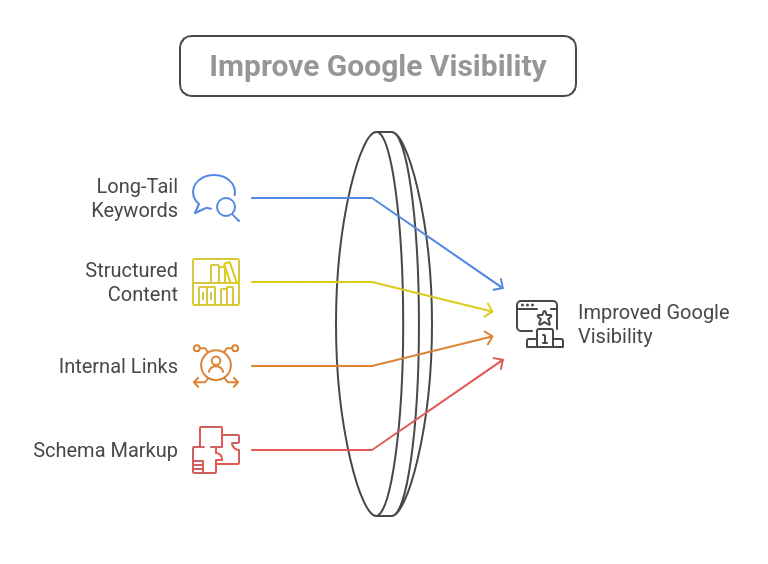
1. Use Long-Tail Keywords
Include specific phrases like:
- How to make my website appear on Google Search
- Why can’t I see my website on Google
- SEO starter guide Google
2. Structure Your Content with Headings
Use H1, H2, H3 tags correctly. This helps Google understand your page structure. A well-structured page also improves readability for users, which can lower bounce rates and improve user engagement — both of which are positive SEO signals. Make sure your H1 includes your main keyword and that subheadings logically break down your content.
3. Add Internal Links
Link your blog posts and service pages together. Internal linking helps with crawling and SEO. They also distribute page authority across your site and help users navigate related content easily. Be sure to use descriptive anchor text that includes relevant keywords, as this gives Google more context about the linked pages.
4. Add Schema Markup
Use structured data (Schema.org) to help Google understand your content. This boosts chances of rich results (stars, FAQs, etc.). Adding schema to your pages can make your listings more visually appealing in search results and increase click-through rates. Common types of schema include article, product, review, FAQ, and local business schema markup.
How to Get Your Website Ranking #1 on Google with SEO Discovery
Getting listed on Google is just the beginning. But reaching the top spot takes more—strategic SEO, consistent effort, and content that delivers real value. It’s a process, but with the right approach, it delivers results that last.
Still feeling stuck? That’s where SEO Discovery comes in. As a leading digital marketing agency, we offer result-driven strategies and affordable starter packages tailored to your business. Whether you need a quick audit or a full SEO roadmap, our experts are here to help you climb the rankings—and stay there.
With over 22 years of experience in digital marketing, SEO Discovery has assisted more than 18,000 clients across 20+ countries, delivering customized strategies that drive tangible business growth.
Want More Traffic, More Leads, and Better Rankings? Start with a Proven Strategy From the Experts!
FAQs on How to Make My Website Appear on Google Search
If your website isn’t showing up on Google, it could be for a few reasons. It might be that your site is brand new and hasn’t been indexed yet, or maybe Google can’t crawl it due to technical issues like blocked pages or missing sitemaps. Sometimes, it’s just because the content isn’t optimized or you haven’t built any backlinks yet, which are important signals for Google to trust and rank your site.
To appear on Google, you first need to make sure Google knows your site exists. Submitting it through Google Search Console is a great first step. From there, focus on creating quality, keyword-rich content, getting other sites to link to yours, and making sure your website is technically sound. Tools like SEO plugins can help a lot with the basics. And don’t forget, staying active—by updating content and adding new pages—keeps your site fresh and more likely to rank.
It depends. For new websites, it can take anywhere from a few days to a few weeks for Google to crawl and index your pages, especially if you haven’t submitted your site through Search Console. The more SEO-friendly your site is, the faster it usually gets indexed.
An SEO starter package is a beginner-friendly service that helps set up the basics of SEO for your website. This usually includes things like keyword research, on-page optimization, submitting your site to Google, creating a sitemap, and even some backlink building. It’s especially useful if you’re new to SEO or just want someone experienced to handle the foundational work for you.
Yes, it’s possible—but it takes time, effort, and the right strategy. Getting to the top spot on Google means having high-quality content that answers what people are searching for, a site that loads quickly and works well on mobile, and strong SEO signals like backlinks from other trusted sites. Hiring an expert or agency can fast-track your results if you’re serious about reaching that top position.
Sometimes, a specific page might not show up even if the rest of your website does. This could be due to a “noindex” tag on the page, duplicate content, or thin content that doesn’t meet Google’s quality standards. You can check the status of any page using the URL Inspection Tool in Google Search Console to see if it’s been indexed or has issues.
Yes, backlinks are a key ranking factor. They act as votes of confidence from other websites, telling Google your content is trustworthy and relevant. Not all backlinks are created equal, though—quality matters more than quantity. That’s why services like guest posting and local SEO are important for growing your link profile naturally and effectively.
If you run a local business, claiming your Google Business Profile is essential. This helps you appear in Google Maps and local search results. Make sure your business name, address, and phone number are consistent everywhere online, and encourage customers to leave reviews. Local SEO strategies also include optimizing your website for local keywords and building local backlinks.