

Objective
Learn how to identify the causes of Google traffic drops and implement effective Google traffic recovery strategies to regain rankings, visibility, and organic growth.
- Use Google Search Console to pinpoint affected pages and queries.
- Fix technical SEO issues quickly to prevent prolonged ranking losses.
- Refresh outdated content and strengthen E-E-A-T signals for recovery.
- Monitor algorithm updates and adapt content to evolving search intent.
- Build authority through internal linking and high-quality backlink acquisition.
Recover Lost Google Traffic with Proven SEO Expertise from SEO Discovery, Starting at $250/Month.
To recover lost Google traffic, you must first diagnose whether technical errors, algorithm updates, or AI Overview changes caused the drop. This Google traffic recovery process begins by using Google Search Console to confirm which pages and queries lost rankings and identify the exact timing of the decline.
Once identified, fix technical issues, update content to match search intent, and strengthen internal linking across key pages. Most Google traffic recovery takes 60–90 days as Google recrawls, reindexes, and reassesses your site’s quality and relevance.
Did You Know? According to data from SE Ranking, approximately 94% of webpages do not receive any Google traffic.
This shows how challenging organic search is, and only a small number of pages are getting visibility. Even small SEO improvements can make a significant difference in rankings, helping websites recover lost traffic faster and regain stable organic performance over time.
This guide covers why traffic drops happen and how to get it back. So read until the end.
- What is AI in healthcare SEO, and why is it critical for lead generation?
- How AI differs from traditional SEO for healthcare
- How is AI used in healthcare SEO? 7 strategies that generate leads
- How to analyze AI for healthcare SEO results
- Turn online searches into patient appointments with SEO Discovery
- How we helped a healthcare business grow with AI-powered SEO
- FAQs about AI for healthcare SEO
Is your organic traffic actually down?
Before you change anything on your site, spend five minutes making sure the drop is actually real. A lot of site owners panic and start making changes, but later realize it was just a tracking error or a normal seasonal drop.
- Track errors in GA4 and GSC: Open GSC alongside GA4. If GSC looks normal but GA4 shows a drop, you likely have a tracking issue, not a ranking problem.
- Seasonal dips vs. real drops: Check the same period from last year in GA4. If traffic drops at the same time every year, it is seasonal, not an SEO issue
Common reasons for a sudden Google traffic drop
Knowing the reason behind your drop is the most important step. Every fix depends on getting this part right. Here are the six most common causes.
Google algorithm update
Google pushes out core updates, Helpful Content updates, and spam updates all year. Each one targets something specific, whether that is content quality, link patterns, or page experience. If your traffic fell sharply around a known update date, that is your first clue. Cross-check the date on Search Engine Land or Search Engine Roundtable. A drop hitting multiple pages on the same day almost always comes from an algorithm change.
Google manual penalty
A manual penalty is less common but hits fast. Google’s reviewers flag your site when they find things like spammy backlinks, copied content, or misused structured data. Open the Manual Actions tab in Google Search Console. If a penalty is there, it will tell you exactly what the issue is. You can also submit a reconsideration request once you fix the problem.
Technical SEO error after a site change
Site updates are one of the most common causes of traffic drops. A theme update, plugin change, or website migration can unintentionally block Google from accessing important pages, break redirects, or create crawl issues that affect rankings and visibility. If your drop happened right after a website change, check the Coverage report in Google Search Console. A sudden rise in crawl errors right after the change is a clear sign that something broke on the technical side.
Backlink loss or toxic link spike
Backlinks carry authority to your pages. When a strong referring domain removes your link or goes offline, your rankings can decrease with it. A sudden flood of spammy links pointing to your site can also trigger Google’s filters. Use Ahrefs or SEMrush and look at your referring domain history around the time of the drop. Any sudden change is worth investigating.
SERP landscape shifted against you
This is one of the most misunderstood causes of traffic loss. Your rankings can stay exactly the same while your clicks fall because Google added AI Overviews, a Featured Snippet, or more ads above your result. Check your GSC Performance report. If impressions held steady but clicks dropped, the SERP changed around you, not your position.
Content decay and search intent drift
People’s search habits change over time. A page written two or three years ago may no longer match what users actually want today. They might want a video now, a step-by-step guide, or a fresher take on the topic. If your best traffic pages have not been updated in a long time, they are likely experiencing content decay that is slowly pulling them down.
How can you recover Google traffic after a sudden drop?
A well-planned Google traffic recovery strategy can help you regain lost visibility, attract more organic visitors, and get your website back on track. Here are some effective ways to improve search performance and support long-term traffic growth.
1. Identify traffic losses with Search Console
Go into your GSC Performance report and filter by page, then by query. Find the pages that lost the most clicks and impressions. Note the exact date the drop started. This one step shows you whether the problem spreads across the whole site or is limited to a few specific pages.
- Look for patterns, such as did one type of content take the biggest hit?
- Check whether your ranking positions dropped or just your click-through rate.
- Export the data and compare 28 days before and after the drop.
Expert advice: Sort pages by the biggest click drop and start your fixes there, not across the whole site at once.
2. Audit your website's technical health
Run a full crawl with Screaming Frog or a similar tool. You are looking for pages that Google cannot access, broken redirect chains, bad canonical tags, and Core Web Vitals issues, especially on mobile.
- Start with your highest-traffic pages, not the quickest wins.
- Resubmit fixed pages through the URL Inspection tool in GSC.
- Validate your structured data with Google’s Rich results test.
Expert advice: Crawl your site right after any update goes live. If a noindex error is caught on day one, it’s a quick fix; and if it’s found weeks later, it costs you months.
3. Optimize content for E-E-A-T
Look at each page that lost traffic and ask yourself honestly: Does the content actually answer the question better than what is ranking right now? If not, that’s where the issue is.
- Add real author credentials and personal perspective where it is missing.
- Refresh outdated stats and fix any broken outbound links.
- Remove sections that do not provide value to readers.
Expert advice: Focus on pages that dropped from positions 4 to 15. They are closest to recovering and move fastest when you improve them.
4. Enhance presence in AI overviews
AI Overviews are showing up for more searches every month. They pull from pages that give direct, well-structured answers backed by credible sources.
- Start each key page with a short, clear answer in the first two sentences.
- Break the content with short paragraphs and clean subheadings.
- Back your points with real data and name the sources you are citing.
Expert advice: Search for your keyword and read the AI Overview that appears. Structure your page with Google’s top search results.
5. Increase visibility in nearby searches
If you run a local business, check your Google Business Profile before making any website changes. Local rankings work differently and often drop for completely separate reasons.
- Make sure your GBP is active, and your name, address, and phone number are consistent everywhere.
- Confirm your business category and website URL are still correct.
- Check for any new negative reviews that could be pulling down your local visibility.
Expert advice: Use a rank tracker that shows local pack positions separately. GSC does not clearly show when your business loses positions in the local map listings.
6. Use internal links to build authority
Fixing what broke is only half the job. You also need to strengthen the signals that support your recovery pages going forward.
- Check that your key recovery pages are getting internal links from other strong pages on your site.
- Add contextual links from well-performing pages to the ones that lost traffic.
- Build new external links through original research, expert content, and digital PR.
Expert advice: Do an internal link audit before rewriting any content. It is often the single fastest way to lift a page back toward its old ranking.
How long does Google Traffic recovery take?
Every website recovers at a different pace depending on the issue. Below is a general timeline to help you understand the process.
Cause | Typical Recovery Timeline |
Technical SEO fix | 2 to 6 weeks after resubmission |
Manual penalty removal | 4 to 8 weeks post-reconsideration |
Algorithm hit | 1 to 3 months; tied to next update cycle |
Content refresh | 60 to 90 days for meaningful traction |
Backlink authority rebuild | 3 to 6 months |
How we help businesses recover lost organic traffic
SEO Discovery brings over 22 years of SEO experience and a team of 400-plus specialists who have helped businesses recover from every type of traffic decline imaginable. From algorithm hits to technical failures to content quality issues, our expert team has seen it all and knows exactly where to look first.
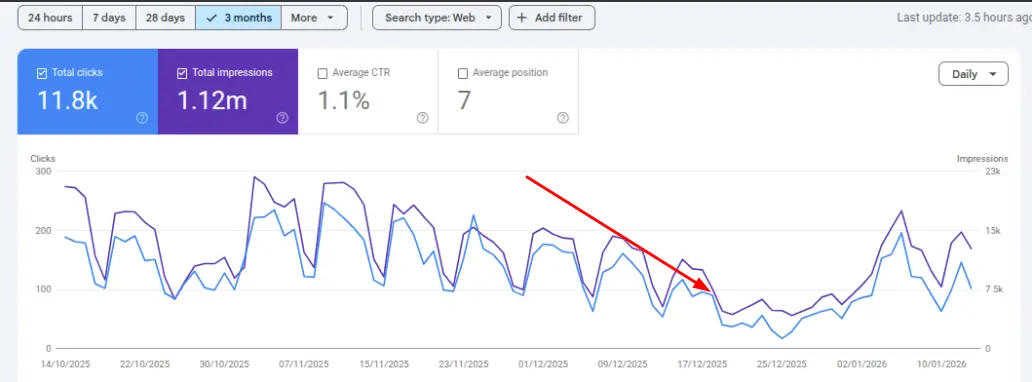
One client came to us after a core update dropped their rankings across several high-performing pages. Their website’s search visibility dropped, leads decreased, and traffic continued to decline because the underlying SEO issues were never properly fixed.
We ran a full recovery audit, resolved the technical problems, improved content quality using E-E-A-T principles, rebuilt internal linking, and refreshed outdated pages. Within a few months, the site had not just recovered but was performing better than it was before the drop.
The results
- Total clicks recovered from 100 to over 200 during the recovery window.
- Total impressions climbed back from 7.5k daily lows toward 15k+.
- Overall, clicks totalled 11.8K during the measured timeframe.
- Total impressions reached 1.12 million over the measured period.
- CTR stabilized at 1.1% after content and technical fixes were applied.
Recover lost traffic with SEO Discovery
A sudden traffic drop is always a signal that something has changed, whether that is on your site, in the search landscape, or in Google’s algorithm. The fastest recoveries happen when you identify the real cause, make smart improvements, and give the process time to work.
If your site has been losing traffic for weeks and you are not sure where to start, SEO Discovery can help. Our best SEO services are built to find what is holding your site back, fix it properly, and build the kind of organic presence that holds up through future updates.
Contact us today to restore your rankings, recover your traffic, and accelerate business growth.
FAQs about Google traffic recovery
It is the process of figuring out why your organic traffic declined and taking the appropriate actions to restore lost rankings, visibility, and website visitors through SEO enhancements.
Cross-check your drop date with the confirmed Google update history on Search Engine Land. If multiple pages dropped on the same date, an algorithm update is the most likely cause.
After a Google core update, recovery usually takes one to three months. Improvements take time to take effect because Google often reevaluates impacted sites during the next core update cycle.
Yes. Fix the violation that triggered the penalty, then submit a reconsideration request through Google Search Console. Recovery typically takes four to eight weeks after Google approves your request.
Yes, refreshing outdated content with current information, improved structure, and stronger E-E-A-T signals can help recover lost rankings, especially for pages experiencing content decay or search intent drift.
You should start with GA4 and Google Search Console. Use Screaming Frog for a thorough technical crawl and Ahrefs or SEMrush for backlink and ranking histories for more in-depth analysis.
Yes. When a high-authority referring domain removes your link or goes offline, your page can lose the ranking authority it was relying on, which leads to a drop in search positions and traffic.
This usually means the SERP layout changed around your result. AI Overviews, Featured Snippets, or additional ads may now appear above your listing, reducing clicks even though your ranking position stayed the same.
Check your Google Business Profile for consistency issues, verify your NAP details are accurate across all directories, and use a rank tracker that shows local pack positions separately from standard organic results.
If your traffic has not recovered after 60 days of fixes, multiple causes are involved, or you lack the tools and time to diagnose properly, working with an experienced SEO agency will significantly speed up recovery.