

Objective:
This blog aims to explain what event count in Google Analytics means, how to track it, and how businesses can use this data to improve user engagement and website conversions.
The interaction between users and your site is key to improving performance, and Google Analytics, along with professional web analytics services, offers the means to monitor it. The Event Count is one important measure in this tracking that helps measure specific actions visitors perform on your site beyond just viewing pages.
Event Counts monitor button clicks, file downloads, video playbacks, form submissions and other interactions. Google Analytics logs every one of these as an event whenever a user takes any of these actions. This can assist you in determining what aspects or content are best capturing the attention of your audience.
Did you know? Websites tracking user interactions with events, such as button clicks or video plays, can improve conversion rates by up to 30%, as it helps identify what content truly engages visitors.
Event Count data will help you make smarter decisions to enhance user experience and optimize your site to convert. As a marketer, business owner, or a site manager, knowing what Event Count is, will allow you to measure engagement and success on your site in a better way.
Key Takeaways
- Event Count shows user actions – It tracks interactions like clicks, downloads, video plays, and form submissions to measure engagement beyond page views.
- Helps optimize your website – Understanding event counts allows businesses to improve UX, content placement, and conversion rates.
- Supports data-driven decisions – Event data guides marketing strategies, campaign effectiveness, and website improvements.
- GA4 simplifies tracking – Google Analytics 4 makes event tracking easier with automatic and custom events for more accurate insights.
Table Of Contents
- What is Event Count in Google Analytics?
- What Does Event Count Mean in Google Analytics?
- Types of Events Tracked in Google Analytics
- How to Set Up Event Count in Google Analytics
- Benefits of Tracking Event Count
- Event Count Metrics and Reports
- Understanding Event Count Values
- How Event Counts Affect Marketing Decisions
- Event Count vs. Other Metrics
- How to Interpret Event Count Data
- Best Practices for Event Count Tracking
- Event Count in Google Analytics 4
- Elevate Your Event Tracking with SEO Discovery's Expertise
- FAQs About What Does Event Count in Google Analytics
What is Event Count in Google Analytics?
In discussing the subject of analytics on your website, you may find yourself asking, what is event count in Google Analytics? As one of the most effective analytics tools, it measures the overall count of occasions on which users execute specific activities on your site that you have specified as events. These events can be any form of interaction that has significance to your business objectives, e.g., a video play, clicking on a link, or even scrolling to a specific part of a page. Every interaction is noted separately, providing you with a clear picture of what motivates interaction.
What Does Event Count Mean in Google Analytics?
To provide an answer to the question what does event count mean in Google Analytics, the answer is the total number of recorded instances of user actions that are recorded as events. For example, when a user presses a button of downloading a brochure thrice during a session, the number of times that the action occurred is three. It is an indicator that assists marketers, web owners, and analysts to quantify the frequency of user interaction with important elements of a site so that data-driven conclusions can be made to enhance user experience and boost conversions.
Types of Events Tracked in Google Analytics
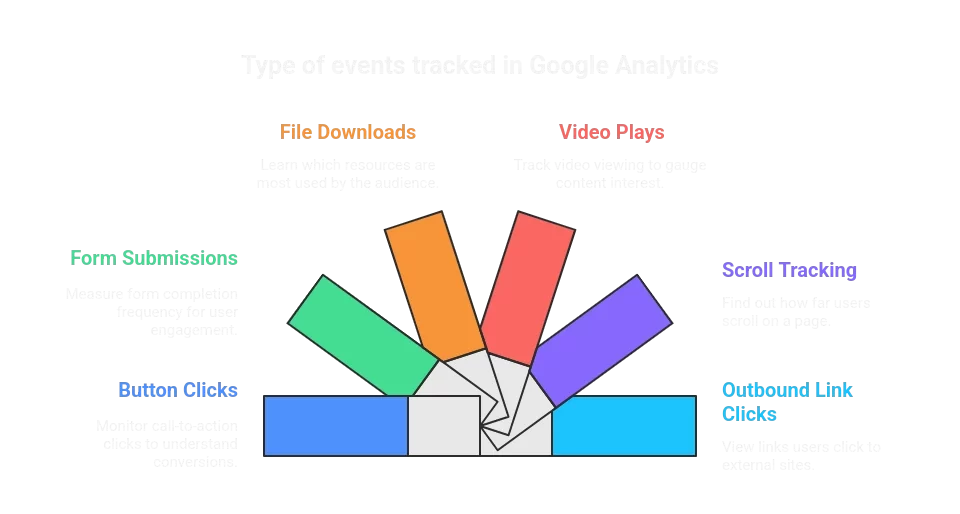
Google analytics records many different interactions using events. The first step to understanding what counts are event counts in Google Analytics is to understand what kinds of events you can track:
- Button Clicks – Monitor call-to-action button clicks to understand what converts.
- Form Submissions – Measure the frequency of contact form or signup form completion by the user.
- File Downloads – Learn what resources your audience uses the most.
- Video Plays – Track the video viewing on your site.
- Scroll Tracking – Find out the distance that users scroll on a page.
- Outbound Link Clicks – View the links where users are going to external sites.
These events provide detailed insights beyond simple page views, helping businesses make data-informed decisions.
How to Set Up Event Count in Google Analytics
It is easy to establish event count Google Analytics tracking. In the case of Universal Analytics, you would normally define events as a combination of category, action and label. In the case of Event Count Google Analytics 4, events are automatically tracked or you can create your own event in Google Tag Manager or the GA4 interface. Follow these steps:
- Define the actions that matter to your business.
- Set up custom events in GA4 or Tag Manager.
- Monitor the Event Count to understand user engagement.
- Analyze the results to optimize website elements.
Benefits of Tracking Event Count
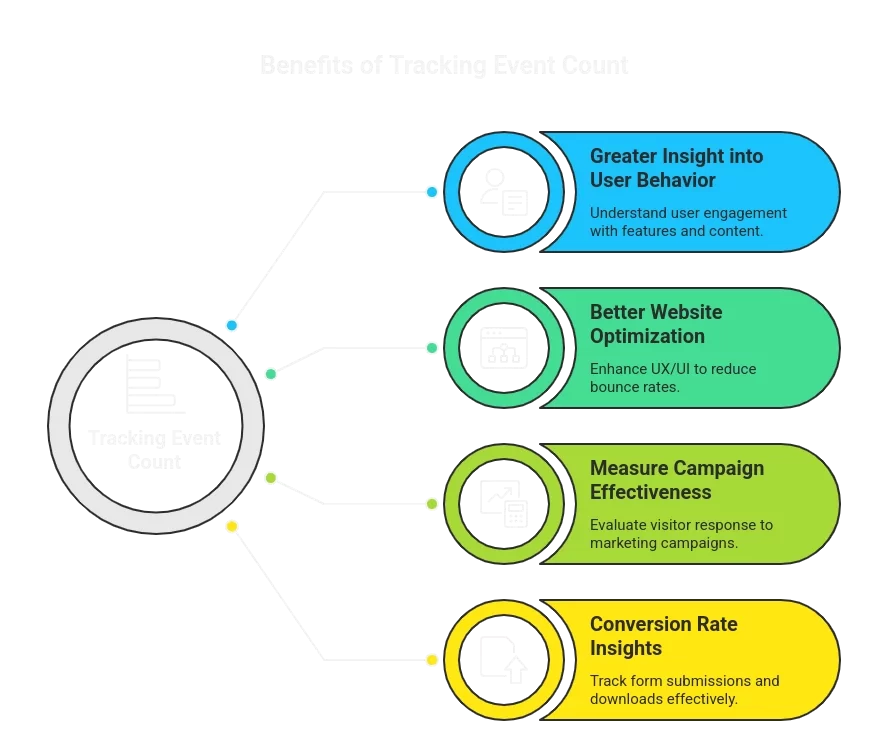
Tracking event count on Google Analytics offers multiple benefits:
- Greater Insight into User Behavior: Determine what features or content produces engagement.
- Better Website Optimization: Event data can be used to improve UX/UI and decrease bounces.
- Measure Campaign Effectiveness: Learn the reaction of visitors to marketing campaigns.
- Conversion Rate Insights: Monitor such important activities as form submissions or downloads.
Unlock the Full Potential of Your Website
Start tracking event counts today with Google Analytics and gain actionable insights to boost engagement, optimize your site, and increase conversions!
Event Count Metrics and Reports
Google Analytics provides comprehensive reports that include Google Analytics event count metrics. These reports allow you to:
- View total events by category or action.
- Analyze trends over time.
- Compare engagement across different pages or devices.
By using these reports, you can understand how users interact with your site at a granular level, helping you prioritize improvements and marketing strategies.
Understanding Event Count Values
The most frequent question is what is event count in Google Analytics and what do the numbers mean. A large number of events means that you have users who are actively using your site, whereas low numbers can indicate usability or content-relevance concerns. Nevertheless, context does matter–some of these events, such as scroll tracking, inherently have larger counts than form submissions. Comparing the number of events with other indicators, including the conversion rates and the duration of the session, will give a full picture.
How Event Counts Affect Marketing Decisions
By analyzing what is the event count in Google Analytics, marketers can make informed decisions about content strategy, website layout, and marketing campaigns. For example:
- High download events indicate popular resources.
- Low video engagement might suggest a need for better placement or shorter content.
- Frequent button clicks can highlight effective calls-to-action.
Event counts help identify strengths and weaknesses in your website and marketing strategy, allowing continuous optimization.
Event Count vs. Other Metrics
Event Count is commonly used in comparison with page views or session metrics. Although page views demonstrate the number of pages that are visited, event count in Google Analytics is more action-oriented. Events offer actionable information on how to better UX, increase engagement, and conversions. The combination of event counts with other metrics provides the whole picture of the site performance.
How to Interpret Event Count Data
It is important to understand what event count is in Google Analytics. Look at the context of individual events, look at the objectives of your site and compare the number of events in various periods. As an illustration, a rise in video plays following a campaign launch can be a sign of successful promotion whereas a drop in form submissions can be an indication of a problem with the usability of the form. The number of events is best used with other behavioral measures to obtain a complete picture.
Best Practices for Event Count Tracking
To maximize insights from event count Google Analytics, follow these best practices:
- Track meaningful interactions only to avoid cluttered data.
- Use descriptive names for events to make reports easier to understand.
- Regularly review event counts to identify trends and opportunities.
- Combine event data with other metrics for actionable insights.
- Test new event tracking to ensure accurate data collection.
Following these practices ensures your event tracking is both accurate and actionable.
Event Count in Google Analytics 4
Tracking is now easier with event count Google Analytics 4. GA4 is more event-based than session-based, i.e. each user interaction is an event. You may follow automatically recorded events, improved measurement events or custom events. This change simplifies the process of tracking user activity, learning how people engage with each other across devices and converting your site.
Elevate Your Event Tracking with SEO Discovery's Expertise
Learning about what events count in Google Analytics is not the end. In order to really leverage the power of this data, enlisting the services of an experienced digital marketing agency, such as SEO Discovery, can be a big difference-maker.
SEO Discovery has more than 22 years of experience in converting raw analytics into actionable insights. Our team of best SEO specialists provides extensive web analytics services to them that are not limited to mere tracking. They assist companies to establish their own events, process complicated data, and apply the strategy that will lead to the increased engagement with the user and subsequent conversion.
By leveraging SEO Discovery’s best SEO services, you can ensure that your event tracking aligns with your business objectives, providing you with a clearer picture of user behavior and enabling data-driven decisions that propel your business forward.
Ready to Turn Your Website Interactions into Measurable Growth?
Partner with SEO Discovery today and unlock the full potential of your Google Analytics data!
FAQs About What Does Event Count in Google Analytics
Event count in Google Analytics measures the total number of times users perform specific actions on your website, such as clicks, downloads, or video plays. Monitoring event counts helps businesses understand engagement and optimize user experience effectively.
A good event count in Google Analytics depends on your website goals, audience size, and type of tracked interactions. High event counts indicate strong user engagement, while lower counts may suggest the need to improve content, call-to-actions, or user experience.
In Google Analytics 4, event count tracking can be configured using automatically collected events or custom events via Google Tag Manager. This allows website owners to measure specific user interactions accurately and improve overall engagement and conversion rates.
Event counts in Google Analytics provide insights into how users interact with your website. They are used to track engagement, optimize website features, measure campaign effectiveness, and make data-driven decisions to enhance conversions and overall website performance.
SEO Discovery offers expert analytics services to help businesses interpret event count data, set up custom events, and apply strategies to enhance user engagement. Their team ensures your website tracking aligns with your business goals and drives meaningful results.
SEO Discovery provides a wide range of services, including SEO optimization, web analytics, content marketing, and digital strategy. Their expertise helps businesses track user interactions, improve website performance, and maximize conversions using data-driven insights.
Choosing SEO Discovery ensures that your event tracking is accurate, actionable, and aligned with business objectives. With 22+ years of experience, they help companies leverage Google Analytics data to improve user experience, engagement, and overall website performance.
Yes, SEO Discovery uses insights from Google Analytics event count and other metrics to optimize your website for higher conversions. By analyzing user behavior, they recommend strategies that increase engagement, reduce bounce rates, and boost overall ROI.