

Ever clicked on a website and felt like it was taking forever to load? You’re not alone.
Most people don’t have the patience to wait around for a slow site. If a page doesn’t pop up within a few seconds, they hit the back button and move on to the next option. It might seem like a small issue, but for website owners, a slow site can lead to a big loss—less traffic, fewer customers, and a lower ranking on Google.
Nowadays, speed matters more than ever. Whether someone is shopping online, reading a blog, or just browsing for information, they expect your website to be fast and smooth. If it’s not, you could be losing potential customers before they even see what you offer.
Google reports that 53% of mobile users will leave a site if it takes longer than 3 seconds to load. And just a 1-second delay can reduce your conversions by 7%.
That’s why improving your website speed isn’t just a technical SEO fix—it’s a smart business move.
In this blog, we’ll break down why speed is so important, how it impacts your SEO, and simple ways you can make your site faster today.
Table Of Contents
- Why Website Speed Matters for SEO?
- How Can I Speed Up My Website?
- How Can I Speed Up My WordPress Website?
- How to Speed Up My Website Load Time Across Any Platform
- Speed Up Your Squarespace Website for Better SEO
- Ecommerce Website Speed Optimization for Better SEO
- Tools to Check and Improve Website Speed
- Why SEO Discovery is Your Go-To Partner for Speeding Up Your Website
- FAQs ABout How Can I Speed Up My Website For Better SEO
Why Website Speed Matters for SEO?
Page speed plays a crucial role in how websites rank on search engines like Google. While Google’s algorithm considers hundreds of factors, speed is a key one. Here’s how a fast-loading website impacts your SEO:
1. Improves User Experience
Users expect websites to load quickly. A fast-loading site provides a smoother, more enjoyable experience, reducing frustration. This enhances the likelihood that visitors will engage with your content and interact with your site.
2. Decreases Bounce Rate
When a page takes too long to load, visitors are likely to leave before it even appears. A faster website helps retain users, reducing the bounce rate. Lower bounce rates signal to search engines that your site provides value, which can boost your rankings.
3. Increases Time on Site
Faster websites encourage users to explore more pages because they don’t have to wait for content to load. Longer sessions on your site are a strong indicator to Google that your content is relevant and engaging, which can positively affect SEO rankings.
4. Boosts Conversion Rates
Speed directly impacts conversion rates—whether it’s making a purchase, filling out a form, or signing up for a newsletter. Faster sites make it easier for users to complete these actions, leading to higher conversion rates, which Google views as a sign of your site’s quality.
5. Signals High Performance to Google
Google prioritizes websites that perform well, and page speed is one of the key metrics it uses to gauge performance. A faster website is often associated with high-quality infrastructure and a commitment to providing users with a seamless experience, which can improve your site’s credibility and rankings.
How Can I Speed Up My Website?
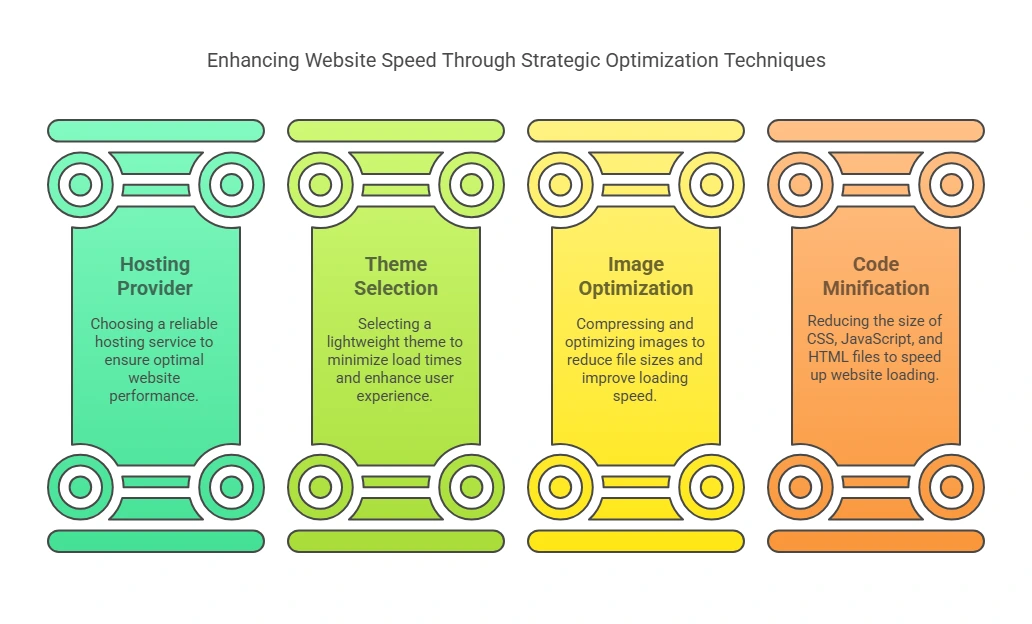
If you’re looking to improve your website’s load time and, in turn, enhance your SEO performance, here’s a comprehensive, step-by-step guide to getting there:
1. Choose a Fast & Reliable Hosting Provider
Your hosting provider is the bedrock of your website’s speed. Opting for a cheap shared hosting plan might seem cost-effective, but it often leads to slower load times due to limited resources and overburdened servers. For better performance, consider upgrading to one of these options:
- VPS Hosting (Virtual Private Server): Provides dedicated resources without the cost of a full server. It’s an ideal middle ground between shared and dedicated hosting.
- Cloud Hosting: Leverages multiple servers, ensuring that your website can scale quickly and efficiently with traffic surges. It’s perfect for sites with fluctuating traffic levels.
- Managed WordPress Hosting (for WordPress users): These providers specialize in WordPress, offering optimized performance, automatic updates, and support tailored to WordPress-specific needs.
2. Use a Lightweight Theme or Template
Many modern themes come packed with flashy features, animations, and unnecessary scripts, which can drag down your website’s speed. While it’s tempting to use feature-rich themes, a lighter theme with a focus on performance will serve you better.
- Choose Performance-Optimized Themes: Whether you’re using WordPress, Shopify, or Squarespace, look for themes specifically designed for speed. These themes are usually stripped down, prioritizing fast loading and easy customization without sacrificing functionality.
- Minimize External Add-ons: Limit the use of excessive third-party widgets, sliders, or customizations that can contribute to slowdowns.
3. Compress & Optimize Your Images
Images are often the biggest culprits behind slow-loading websites. High-resolution images might look beautiful, but they can significantly slow your site down. Here’s what you can do:
- Compress Images: Tools like TinyPNG, ImageOptim, and ShortPixel (for WordPress) are great for reducing file sizes without sacrificing quality.
- Use Modern Formats: Modern image formats like WebP provide high-quality images at smaller file sizes compared to traditional formats like JPEG and PNG.
- Lazy Load Images: Implement lazy loading so images only load when they come into view as the user scrolls down the page. This reduces the initial load time.
4. Minify CSS, JavaScript, and HTML
Your website’s code—HTML, CSS, and JavaScript—can often be bloated with extra spaces, comments, and unused code. Minification helps reduce the file size of these elements, leading to faster load times.
- Use Minification Tools: Tools like WP Rocket, Autoptimize, and Cloudflare (which offers built-in minification) can automatically minify your files and serve smaller, optimized versions of them to visitors.
- Combine Files: Combining multiple CSS or JavaScript files into a single file reduces the number of HTTP requests needed to load a page. Just ensure that combining doesn’t break functionality or styling.
- Asynchronous JavaScript: For scripts that aren’t necessary to load immediately, consider making them asynchronous to prevent them from blocking the page’s render.
Need Help with Hosting, Themes, or Image Compression? Get Expert Guidance and Practical Solutions!
How Can I Speed Up My WordPress Website?
If you’re using WordPress, you’re in luck—there are countless ways to make your site faster. Here are 10 proven techniques to help you optimize your WordPress website’s speed:
How to Speed Up Your WordPress Website: 10 Proven Techniques
1. Use a Caching Plugin
Caching can significantly reduce your site’s loading time by storing static copies of your content, thus minimizing the need for repeated database queries. Installing a caching plugin is one of the easiest and most effective ways to boost WordPress speed.
Recommended Plugins:
- WP Rocket: A premium plugin with a range of advanced caching features and optimizations.
- W3 Total Cache: A free plugin that offers comprehensive caching features.
- LiteSpeed Cache: Great for sites hosted on LiteSpeed servers, providing both caching and optimization features.
2. Optimize Your Database
Over time, your WordPress database can become cluttered with unused data like post revisions, spam comments, and transient options. Cleaning up your database can reduce its size and speed up queries.
Plugin to Use:
- WP-Optimize: This plugin can clean your database, remove unnecessary data, and optimize it for faster performance without needing technical expertise.
3. Limit Plugins
While plugins can enhance your site’s functionality, too many of them can slow down your website. Some plugins also conflict with one another, causing additional issues.
Best Practices:
- Audit Plugins: Deactivate and remove any plugins you don’t need or use.
- Choose Well-Coded Plugins: Only use trusted, lightweight plugins that don’t overload your server resources.
4. Lazy Load Images
Lazy loading ensures that images are only loaded when the user scrolls to them, instead of all at once when the page is loaded. This reduces initial page load time, especially for image-heavy sites.
How to Implement:
- Lazy Load Plugin: Use plugins like a3 Lazy Load or enable lazy loading through WP Rocket.
- Native Lazy Loading in WordPress: WordPress 5.5 and later versions natively support lazy loading, so make sure you’re on a current version.
5. Enable GZIP Compression
GZIP compression reduces the size of your website’s files, making them faster to download. It’s a simple and effective way to speed up your site.
How to Enable:
- Many caching plugins, such as WP Rocket and W3 Total Cache, automatically enable GZIP compression.
- Alternatively, you can add the necessary code to your .htaccess file if you’re comfortable with that.
6. Use a Content Delivery Network (CDN)
A Content Delivery Network (CDN) distributes your website’s content across multiple servers located around the world. This allows users to download files from a server geographically closer to them, reducing latency and improving load times.
Recommended CDNs:
- Cloudflare: A widely used CDN that offers free and paid plans, known for its security and performance features.
- BunnyCDN: An affordable, fast CDN provider ideal for WordPress websites.
7. Update Your PHP Version
Running an outdated version of PHP can slow down your website, as newer versions are optimized for speed and performance improvements. WordPress performs best on PHP 7.4 or later.
How to Update:
- Check your PHP version in your WordPress dashboard under Tools > Site Health.
- Most hosting providers offer an option to update PHP via the control panel (e.g., cPanel or Plesk).
8. Disable Hotlinking
Hotlinking occurs when another website directly links to your images, using your server’s bandwidth. This can slow down your website and waste your server’s resources.
How to Prevent Hotlinking:
- Add a simple code to your .htaccess file to prevent other sites from hotlinking to your images.
- Alternatively, use a security plugin like Wordfence to block hotlinking.
9. Reduce Redirects
Each time a user encounters a redirect, the browser has to make an additional HTTP request. Too many redirects can add up and slow down your website.
Best Practices:
- Avoid unnecessary redirects in your internal linking structure.
- Use a plugin like Redirection to monitor and manage redirects efficiently.
10. Monitor Speed Regularly
It’s important to monitor your website’s speed regularly so you can catch any performance issues early. Tools like GTmetrix, Google PageSpeed Insights, and Pingdom offer insights into your website’s speed and pinpoint areas that need improvement.
Tools to Use:
- GTmetrix: Offers detailed performance reports and actionable suggestions.
- PageSpeed Insights: Provides Google’s recommended optimizations for better speed and mobile performance.
Pingdom: A tool for monitoring website uptime and performance over time.
How to Speed Up My Website Load Time Across Any Platform
No matter which platform you use—WordPress, Shopify, Wix, Squarespace, or any other website builder—these universal tips will help you optimize your website’s load time and improve user experience.
- Keep Third-Party Scripts to a Minimum
- Limit Web Fonts or Use System Fonts
- Reduce HTTP Requests by Combining Files
- Use Asynchronous Loading for JavaScript
- Prioritize Above-the-Fold Content
- Remove Unused CSS and Plugins
Speed Up Your Squarespace Website for Better SEO
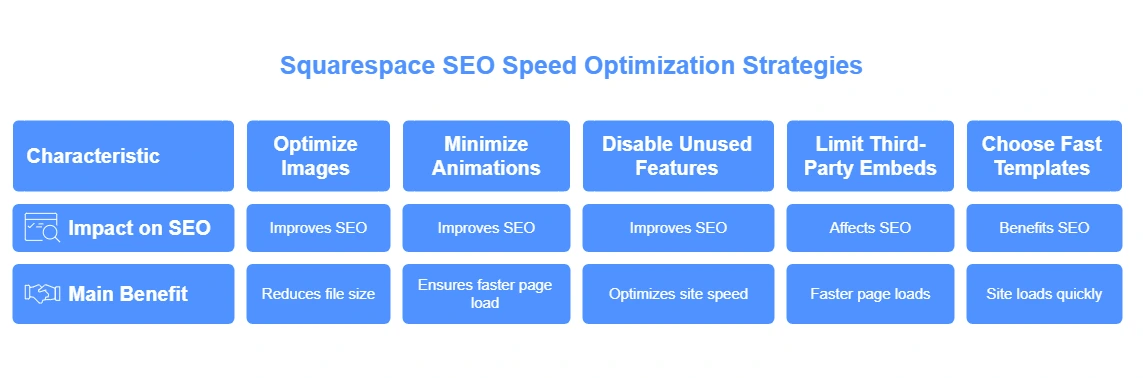
To improve your Squarespace SEO and ensure a better user experience, optimizing your website’s load speed is essential. Here are key strategies to speed up your Squarespace site:
1. Optimize Image Sizes Before Uploading
Images often make up the largest files on your website, and large image sizes can significantly slow down your site’s performance, negatively impacting Squarespace SEO. Compress your images using tools like TinyPNG or ImageOptim to reduce file size without losing quality.
2. Use Minimal Animations and Transitions
While animations and transitions can make your site visually appealing, they can also increase load time, which harms both the user experience and Squarespace SEO. Avoid overusing animations and opt for simple, smooth transitions. This not only ensures a faster page load but also improves your website’s mobile responsiveness—important factors in improving your SEO.
3. Turn Off Unused Features or Blocks
Squarespace offers a wide array of features and blocks, but not all are necessary. Extra features that aren’t being used still consume resources and slow down your site. Review your site regularly and disable or remove any unused blocks or features to optimize site speed. A streamlined site ensures better load times and is favored by search engines, improving your Squarespace SEO.
4. Avoid Third-Party Embed Overload
Third-party embeds such as Instagram feeds, YouTube videos, and external widgets can add external requests, significantly slowing your website. While these elements can enhance user experience, they also affect Squarespace SEO. Limit the number of third-party embeds on each page, or replace them with alternatives like self-hosted videos or lightboxes. Reducing third-party dependencies results in faster page loads and improved SEO.
5. Choose Fast-Loading Templates
The Squarespace template you choose plays a big role in your site’s speed. Templates like Brine and Five are known for being lightweight and fast-loading, making them ideal for Squarespace SEO. These templates prioritize performance and clean design, helping your site load quickly and ensuring a smooth user experience, which ultimately benefits your SEO rankings.
Ecommerce Website Speed Optimization for Better SEO
For an ecommerce website, speed is key to both customer satisfaction and ecommerce SEO. A slow-loading site can lead to abandoned carts and lost sales. Here are quick tips to speed up your site:
1. Use a Scalable and Secure Hosting Plan
Choose a fast, scalable hosting plan like Shopify Plus or WooCommerce with VPS to ensure your site can handle traffic spikes and load quickly, boosting both performance and ecommerce SEO.
2. Compress Product Images
Large images slow down your site. Compress product images using tools like TinyPNG to maintain quality while reducing load time, improving ecommerce SEO.
3. Enable Lazy Loading
Lazy loading delays the loading of images until they’re needed. This helps improve load time on product grids, reducing bounce rates and supporting ecommerce SEO.
4. Simplify Navigation
Simplify your homepage and navigation to reduce load times and improve user experience. Clear categories and essential content help with faster page loads and better SEO.
5. Use AMP for Product Pages
Implement AMP for faster mobile load times, which is crucial as mobile traffic drives most e-commerce sales. This improves both user experience and ecommerce SEO.
Tools to Check and Improve Website Speed
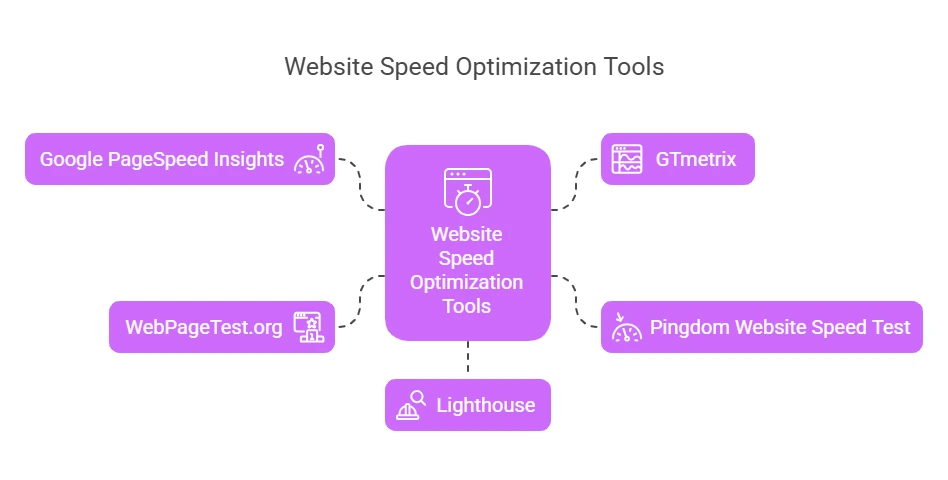
Before and after optimizing your website, it’s crucial to measure its performance to ensure improvements have been made. The following tools allow you to check your website’s speed and provide recommendations for further optimization:
1. Google PageSpeed Insights
Google PageSpeed Insights is a free tool that analyzes your website’s speed on both mobile and desktop devices. It provides a score from 0 to 100 and offers actionable recommendations to improve load time. It also highlights factors like server response time, image optimization, and caching, all of which can help boost website performance and SEO.
2. GTmetrix
GTmetrix provides a detailed report on your website’s performance, breaking down elements like page load time, total page size, and the number of requests made. It also offers a “Waterfall Chart” to visualize how your website loads. GTmetrix suggests improvements and includes recommendations for optimizing images, scripts, and more, helping you improve your website speed and user experience.
3. Pingdom Website Speed Test
Pingdom is another powerful tool that lets you test the load time of your website from various locations around the world. It gives a performance grade based on several factors, including file sizes, load times, and performance history. Pingdom is useful for pinpointing bottlenecks and tracking the success of your speed optimization efforts.
4. WebPageTest.org
WebPageTest.org allows you to test your site’s performance from different browsers and locations. It generates a detailed report that includes metrics like load time, first byte, and time to interact. WebPageTest also offers advanced settings, such as the ability to simulate slower connection speeds, making it useful for testing how your website performs under different conditions.
5. Lighthouse (Built into Chrome DevTools)
Lighthouse is an open-source, automated tool built into Chrome DevTools that audits your website’s performance, accessibility, SEO, and best practices. It provides a comprehensive report, including a performance score, and highlights areas for improvement such as unused CSS, large JavaScript files, and other elements that may slow down your site. Lighthouse is particularly useful for developers seeking detailed insights.
Why SEO Discovery is Your Go-To Partner for Speeding Up Your Website
While the tips above are powerful, implementing them the right way takes time, technical skills, and ongoing effort. If you’re asking yourself, “How can I speed up my website without the stress?”—that’s where SEO Discovery comes in.
SEO Discovery is the best digital marketing agency that has helped over 18,000 businesses improve their website performance, search engine rankings, and conversion rates. Whether you’re running a WordPress blog, a Squarespace portfolio, or a full-scale ecommerce website, their team knows exactly how to deliver blazing-fast load times and SEO-friendly architecture.
- Proven expertise in website speed optimization
- Tailored solutions for WordPress, Shopify, Magento, and more
- Transparent reporting and measurable results
- A team of 400+ professionals working across 20+ countries
- Recognized as the Best SEO Company in India by multiple platforms
Want Your Website to Load in Seconds, Not Seconds Too Long? Team Up with Us and Feel the Difference!
FAQs About How Can I Speed Up My Website For Better SEO
Website speed is important for SEO because search engines like Google prefer fast websites. If your website loads slowly, it can cause users to leave quickly, and Google may rank your site lower in search results. A fast site improves user experience and helps with better rankings.
To speed up a WordPress website, try using a caching plugin like WP Rocket or W3 Total Cache to store copies of your pages. You can also optimize your images with tools like TinyPNG, minimize unnecessary plugins, and use a Content Delivery Network (CDN) to serve your site faster worldwide.
Lazy loading means that images and videos on your website load only when the user scrolls down to them. This reduces the load time for the initial page, especially on pages with a lot of media, making your website faster overall.
To make images load faster, you should compress them to reduce their file size. You can use tools like TinyPNG or ImageOptim. Also, ensure your images are the right size before uploading them and consider using modern formats like WebP for better compression.
You can check your website’s speed using tools like Google PageSpeed Insights, GTmetrix, or Pingdom. These tools give you reports on how fast your site is and suggest ways to make it faster.
Yes, a slow website can make people leave before completing a purchase or filling out a form, which hurts your conversion rates. Even a small delay can cause potential customers to go elsewhere, which means fewer sales or leads.
The type of hosting you choose can make a big difference in your website’s speed. If you’re using shared hosting, your site might be slower because you share server resources with others. Switching to a better option, like VPS or managed WordPress hosting, can improve speed.
Hotlinking happens when other sites use your images, which takes up your bandwidth and slows your site down. To stop hotlinking, you can add a line of code to your website’s settings or use a security plugin to block it.