


Objective
This guide explains how to make your website appear on Google Search. It covers how Google finds and indexes pages, how to check if your site is indexed, why sites go missing, 10 steps to fix it, and how to show up in AI Overviews.
- Google finds most pages on its own through links and sitemaps. You cannot pay Google to crawl or rank your site faster.
- Check first, fix second. A site: search and the Page indexing report in Search Console show what Google has indexed and what it skipped.
- Most missing websites have one of five problems: too new, blocked by robots.txt or noindex, crawl errors, thin or duplicate content, or no links pointing in.
- Submitting an XML sitemap in Search Console is the fastest safe way to tell Google about a new site.
- Google says a new URL is typically discovered in about 20 hours, but slow cases take weeks and low-quality pages may never be indexed.
- Being indexed is not the same as ranking. Ranking depends on helpful content, search intent match, links and page experience.
- There is no separate trick for AI Overviews. A page must be indexed and eligible for a snippet, and then quality decides.
You launched your website, searched for it on Google, and found nothing. It is one of the most common questions site owners ask, and the cause is usually fixable in an afternoon.
To make your website appear on Google Search, verify it in Google Search Console, submit an XML sitemap, make sure no robots.txt rule or noindex tag blocks it, and publish useful content that other sites link to. Then check the Page indexing report to see which pages Google has indexed and why others were skipped.
Did You Know?
Only about 38% of pages cited in Google AI Overviews also rank in the top 10, down from 76% in mid-2025. Source: Ahrefs
Google is clear on two points. It does not accept payment to crawl a site more often or rank it higher, and it does not guarantee that any page will be indexed. So the job is to remove what blocks Google, then give it good reasons to show your pages. This guide walks through both, step by step, with help from our SEO company experience.
Website Still Missing from Google? Get a Free Indexing and Technical Check from SEO Discovery
Table Of Contents
- How does Google find and show a website?
- How do I check if my website is on Google?
- Why is my website not showing up on Google?
- How to make my website appear on Google Search: 10 steps
- How long does it take for a website to show up on Google?
- How do I get my website into Google AI Overviews?
- Common mistakes that keep websites off Google
- Final note: get found, then get chosen
- FAQs on how to make my website appear on Google Search
How does Google find and show a website?
Google works in three stages: crawling, indexing and serving. Your page must pass all three to appear in results.
According to Google’s guide to how Search works, the process looks like this:
| Stage | What Google does | What can stop your page |
|---|---|---|
| 1. Crawling | Googlebot discovers URLs through links, past visits and sitemaps, then downloads the page | robots.txt blocks, login walls, server errors, no links pointing in |
| 2. Indexing | Google reads the content and tags, groups duplicates and picks a canonical version to store | noindex tags, duplicate or thin content, wrong canonical |
| 3. Serving | Google ranks indexed pages for each search by relevance and quality | weak content, poor intent match, few quality links |
The fix depends on the stage. A page that is never crawled needs a technical fix. A page that is indexed but sits on page five needs better content and authority. Google also notes that the vast majority of pages in its results are found automatically, not submitted by hand, so links and sitemaps do most of the discovery work.
“Getting indexed is a technical job. Getting chosen is a content job. Most websites that are missing from Google fail the first test, not the second, so always confirm what Search Console says before rewriting a single page.”
How do I check if my website is on Google?
Search site:yourdomain.com on Google for a quick check, then use the URL Inspection tool in Search Console for a definite answer on any single page.
1. Run a site: search
Type site:yourdomain.com into Google. If results appear, at least some pages are indexed. If nothing appears, Google has not indexed the site yet or something is blocking it. Treat this as a rough check only, since the result count is an estimate.
2. Use the URL Inspection tool
In Google Search Console, paste any URL into the search bar at the top. It shows if the page is indexed, when Google last crawled it, which canonical it chose, and whether the page loaded correctly.
What to do: If the page is not indexed and the cause is fixed, click Request Indexing to ask Google to recrawl it.
3. Read the Page indexing report
Go to Indexing, then Pages, in Search Console. It lists every URL Google knows about and the reason any page was not indexed. It is the most useful report for this problem, and the next section explains its most common statuses.
Why is my website not showing up on Google?
The usual causes are a site that is too new, a robots.txt or noindex block, thin or duplicate content, a manual action, or too few links for Google to find and trust it.
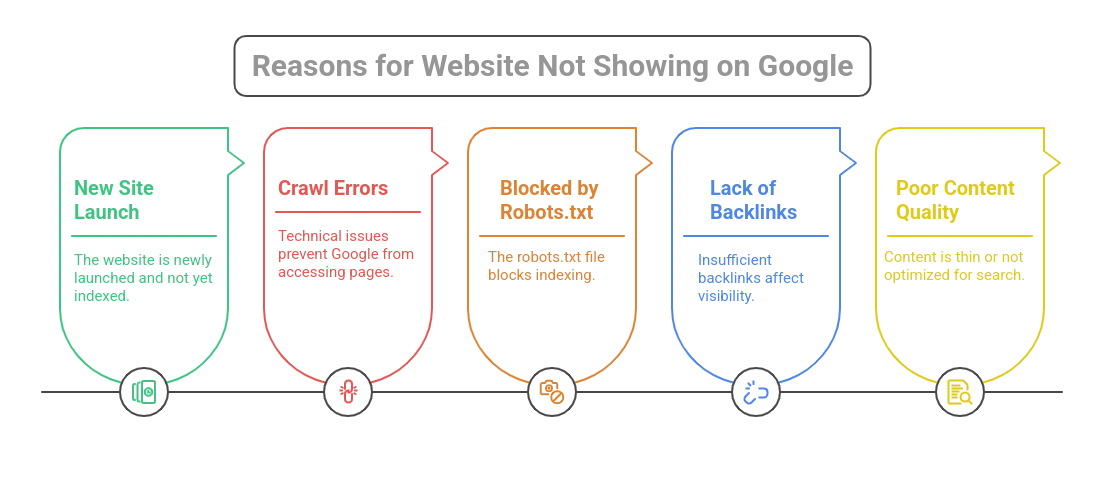
1. Your site is new and not yet discovered
Google has to find a URL before it can index it. A brand-new domain with no sitemap and no links pointing to it can wait a long time.
What to do: Submit your XML sitemap in Search Console and get a few relevant sites to link to you.
2. robots.txt is blocking Google
A single rule can hide a whole site. This one blocks every crawler from every page:
User-agent: *
Disallow: /
It often happens after a site moves from a staging server.
What to do: Open yourdomain.com/robots.txt and remove any rule that blocks important pages. In WordPress, also go to Settings, then Reading, and untick “Discourage search engines from indexing this site.”
3. A noindex tag is on the page
This tag in the page head tells Google not to index the page:
<meta name="robots" content="noindex">Many SEO plugins add it to archive or tag pages by default, and it is easy to switch on by mistake for a post.
What to do: Check the robots setting in your SEO plugin for each page that should rank, then inspect the URL again.
4. Content is thin, duplicate or unhelpful
Google groups near-duplicate pages and indexes only one. Pages with little original value may be crawled and then left out. Solid on-page SEO and original content fix most of these cases.
What to do: Merge pages that cover the same topic, and add first-hand examples, data or steps that competing pages lack.
5. A manual action or security issue
A manual action for spam, or a hacked-site warning, can remove pages from results until the issue is fixed and a review is requested.
What to do: Open Security and Manual actions in Search Console. Fix every listed issue, then submit a reconsideration request.
What the Page indexing statuses mean
| Status in Search Console | What it means | What to do |
|---|---|---|
| Discovered, currently not indexed | Google knows the URL but has not crawled it yet | Add internal links to it, keep it in the sitemap, improve server speed |
| Crawled, currently not indexed | Google crawled it and chose not to index it for now | Improve content depth and uniqueness, link to it from strong pages |
| Excluded by noindex tag | A noindex tag is on the page | Remove the tag if the page should rank |
| Blocked by robots.txt | A robots.txt rule stops crawling | Edit the rule, then test the URL again |
| Duplicate without user-selected canonical | Google sees it as a copy of another page | Add a canonical tag or merge the pages |
| Not found (404) | The URL returns an error | Restore the page or redirect it to the closest match |
| Page with redirect | The URL redirects elsewhere | Usually fine. Make sure the sitemap lists the final URL |
Not Sure Why Google Is Skipping Your Pages?
Our technical SEO audit finds crawl, index and canonical issues page by page.
How to make my website appear on Google Search: 10 steps
Steps 1 to 3 get your site indexed. Steps 4 to 10 help it rank once it is indexed.
1. Verify your site in Google Search Console
Add a Domain property in Google Search Console and verify it with the DNS record your host or registrar lets you add. A domain property covers every version of your site (http, https, www and non-www) in one place.
2. Create and submit an XML sitemap
Most SEO plugins, such as Yoast SEO or Rank Math, create a sitemap for you, often at yourdomain.com/sitemap_index.xml. In Search Console, open Indexing, then Sitemaps, paste the sitemap URL and click Submit.
What to do: List only pages you want indexed, and only their final URLs. Remove redirects, 404s and noindexed pages from the sitemap.
3. Remove anything that blocks crawling or indexing
- Test key URLs with URL Inspection and confirm the page is available to Google.
- Check yourdomain.com/robots.txt for any Disallow: / rule.
- Remove noindex tags from pages that should rank.
- Make sure each page points its canonical tag to itself, or to the version you want shown.
A technical SEO audit finds these problems across the whole site at once.
4. Write content that matches search intent
Search your main keyword and study the top results. Are they guides, product pages or local listings? Match that format, then add what they lack: first-hand experience, original examples, screenshots or clearer steps.
Google’s systems favour content made to help people, not to fill a keyword list. If writing is a bottleneck, professional content writing services can keep quality consistent.
5. Optimize titles, meta descriptions and headings
- Put the main topic near the start of the title tag, in under about 60 characters.
- Write a meta description that says what the page delivers. Google may rewrite it, but a clear one is used more often.
- Use one H1, then H2 and H3 headings that read like the questions people ask.
- Add descriptive alt text to images.
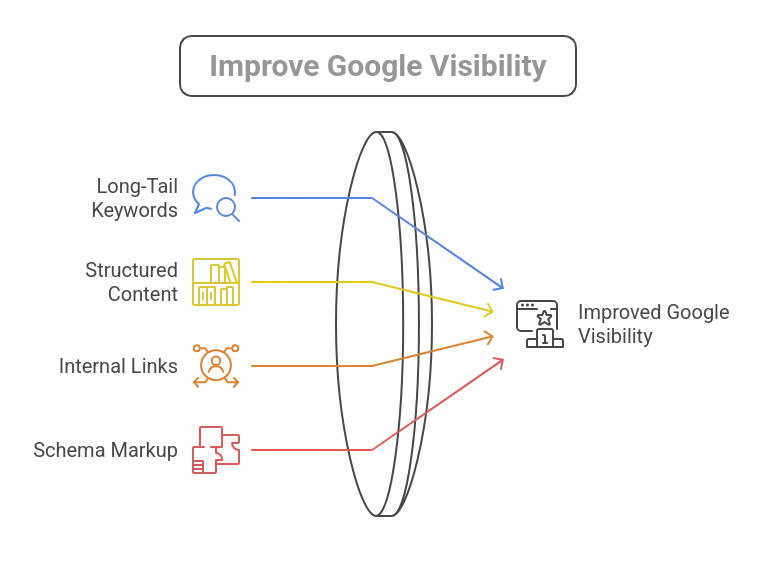
6. Build internal links to every important page
Pages with no internal links, often called orphan pages, are hard for Google to find. Link new posts from related posts and service pages using descriptive anchor text. Our guide on why internal linking is important explains how to plan this.
Want These Steps Done for You?
Our team handles setup, fixes and ongoing optimization for your website.
7. Earn links from relevant websites
Links from other sites help Google discover your pages and judge their importance. Focus on relevance over volume: industry directories, partners, local news, podcasts and useful guest articles. A content marketing and link building approach, or managed guest post services, can speed this up.
8. Make the site fast and mobile-friendly
Google indexes the mobile version of your site, so mobile pages must show the same content as desktop. Test pages in PageSpeed Insights and check the Core Web Vitals report in Search Console. Compress images, use caching and choose reliable hosting.
9. Set up Google Business Profile (local businesses)
If you serve customers in a set area, a verified Google Business Profile can put you in Google Maps and the local pack, often before your website ranks organically. Keep your name, address and phone number identical everywhere, and add local business schema to your site.
10. Submit your site to Bing Webmaster Tools too
Bing Webmaster Tools can import your sites directly from Search Console in a few clicks. Turning on IndexNow, which many SEO plugins support, notifies Bing and other participating search engines whenever you publish or update a page.
If you would rather hand all ten steps to a specialist, you can hire an SEO specialist or choose one of our digital marketing packages.
How long does it take for a website to show up on Google?
Google typically discovers a new URL in about 20 hours and indexes it within hours after that. Slow cases take weeks, and pages Google judges low quality may never be indexed.
At Search Central Live in Barcelona on October 2, 2026, Google’s Gary Illyes shared typical timings from Google’s internal analysis, as reported by PPC Land:
| Process | Typical time | Slowest cases |
|---|---|---|
| Discovering a new URL | About 20 hours | Weeks, or never |
| Processing a submitted sitemap | About 24 hours | Up to 14 days, or never (quality) |
| Picking up a robots.txt change | About 24 hours | 25 hours |
| Indexing a page, end to end | About 1.5 hours | Months, or never (quality) |
| Updating a title or snippet | 1 to 2 days | Several weeks to months |
| Lifting a manual action after review | 1 to 2 weeks | 4 to 6 weeks or longer |
| Recovering after a core update | 3 to 6 months | Up to the next core update |
Speed is rarely the real problem. If a page is still missing after two weeks, the cause is usually discovery (no links, not in the sitemap) or quality, not Google being slow. Indexing is also only the first step. Ranking for competitive keywords takes much longer.
How do I get my website into Google AI Overviews?
Google says there are no extra requirements for AI Overviews or AI Mode. A page must be indexed and eligible to show a snippet in Google Search. After that, the same quality signals that drive normal rankings decide which pages are cited.
Google’s AI features documentation says no special optimization is necessary. Its May 2026 guide, Optimizing your website for generative AI features on Google Search, lists several popular GEO and AEO tactics as myths, including splitting content into short artificial chunks for LLMs.
AI answers do reach beyond page one, though. Ahrefs found that only about 38% of URLs cited in AI Overviews also rank in the top 10, and about 31% rank outside the top 100. A page that clearly answers a specific question can be cited before it ranks well.
What helps, in practice:
- Answer first. Open each section with a direct one or two sentence answer.
- Use question-style headings that match how people actually ask.
- Add original value: your own data, examples, screenshots or tested steps. Google names unique, non-commodity content as the core factor.
- Keep pages current. Update or remove outdated pages.
- Do not block snippets. A nosnippet tag or a very low max-snippet value limits how your page can appear in AI features.
- For ChatGPT and Perplexity, make sure robots.txt does not block their search crawlers (OAI-SearchBot and PerplexityBot) if you want to be cited there.
AI Overviews and AI Mode traffic is included in the Search Console Performance report under the Web search type, so you can track it alongside normal clicks.
Common mistakes that keep websites off Google
- Leaving “Discourage search engines” ticked in WordPress after launch.
- Submitting a sitemap full of redirects, 404s or noindexed URLs. It sends mixed signals and wastes crawling.
- Publishing many near-identical pages, such as city pages that only swap the town name.
- Relying only on Request Indexing. It speeds up one URL but does not fix quality or discovery problems.
- Buying bulk links or “guaranteed page one” packages. These can lead to a manual action.
- Changing URLs without 301 redirects, which loses the signals the old pages built.
- Blocking CSS or JavaScript in robots.txt, so Google cannot render the page as users see it.
Final note: get found, then get chosen
Getting your website on Google comes down to two jobs. First, remove anything that stops Google from finding and indexing your pages, and confirm it in Search Console. Second, publish pages that answer real questions better than what already ranks, and earn links that prove it. The same work now decides whether you are cited in AI Overviews.
If you would rather have experts handle it, SEO Discovery has spent more than 22 years helping businesses in over 20 countries grow their search visibility. Our SEO services cover technical fixes, content and link building, with clear reporting at every step.
Need Expert Help Getting Found on Google?
Our team reviews what is holding your website back and shows you what to fix first.
FAQs on how to make my website appear on Google Search
The most common reasons are that the site is too new to be discovered, robots.txt or a noindex tag is blocking it, the content is thin or duplicated, or no other sites link to it. The Page indexing report in Search Console shows the exact reason for each URL.
Verify your site in Google Search Console and submit your XML sitemap. Both are free. Google does not charge to crawl or index a site and does not accept payment to rank one higher.
Google has said a new URL is typically discovered in about 20 hours and indexed soon after. Some pages take weeks, and low-quality pages may never be indexed. Ranking well for competitive terms takes much longer.
Search site:yourdomain.com for a quick look. For an exact answer, paste a URL into the URL Inspection tool in Search Console.
Google visited the page but chose not to add it to the index for now. This usually points to quality or duplication. Improve the content and link to the page from stronger pages on your site.
No. It asks Google to recrawl the URL sooner, but indexing still depends on whether the page is accessible and useful.
Indexing only means Google stored the page. Ranking depends on search intent match, content quality, links and page experience. Compare your page with the current top results and close the gaps.
You can be indexed without them if your sitemap and internal links are in place. To rank for competitive searches, links from relevant, trusted sites make a clear difference.
Google says no special optimization is required. Your page must be indexed and eligible to show a snippet. Clear, direct answers, original information and up-to-date content improve your chances of being cited.
It is worth doing. Bing Webmaster Tools can import your sites from Google Search Console, and IndexNow lets you notify Bing about new and updated pages quickly.