

Objective
This blog explains how much it costs to hire a digital marketer, pricing factors, the cost of different services, and how companies can choose cost-effective digital marketing solutions for increased online growth and ROI.
- In India, the price of digital marketing can be between Rs. 10,000 and Rs. 100,000+ per month.
- Globally, digital marketing services range from $500 to $5,000+ per month.
- SEO, PPC, and social media marketing need to be budgeted separately.
- Overall marketing expenses are directly affected by business objectives and campaign scope.
- Choosing the right marketing partner maximizes ROI and builds long-term business growth.
Grow Your Online Presence with Digital Marketing Experts from SEO Discovery, Starting at $350/Month.
Hiring a digital marketer in India usually costs between Rs. 10,000 and Rs. 100,000+ per month, depending on the experience level, services required, and hiring model. Freelancers charge $15–$100 per hour globally, while in-house digital marketers may cost $1,500–$4,000+ per month.
Did you know? According to Research and Markets, the global digital marketing market is projected to reach USD 1.20 trillion by 2034.
Selecting the appropriate digital marketer is important for enhancing online presence, attracting the correct target audience, generating high-quality leads, and increasing conversions. An experienced marketer helps companies create effective SEO, paid ad, content, and social media strategies that generate long-term growth and stronger customer engagement.
In this guide, we will explain how much it costs to hire a digital marketer, the different pricing models available, and how to get the best value from your investment. Continue reading till the end.
Table Of Contents
- What is a digital marketer?
- Why is hiring a digital marketer important?
- Factors affecting digital marketing costs
- Typical pricing models for digital marketing
- Average costs of digital marketing services
- How to make digital marketing cost-effective?
- Comparing costs: freelancer vs agency vs in-house
- Digital marketing costs in India
- How we delivered better ROI for a client
- How SEO Discovery can help you save on digital marketing costs
- FAQs about how much it costs to hire a digital marketer
What is a digital Marketer?
A digital marketer is an individual who deals with the marketing of brands, products, or services through online means. As opposed to conventional marketing that centers on offline marketing strategies such as print advertisements, billboards, and television ads, digital marketing is an online tool that helps to connect and communicate with the target market.
Digital marketers develop and coordinate campaigns on different platforms such as social media, search engines, email, and websites. They aim to be seen, get potential customers, and turn them into loyal clients. They also monitor the performance through the analytics tools, which enable businesses to make data-led decisions and optimize marketing strategies.
Some key responsibilities of a digital marketer include:
- Search engine optimization (SEO): Improving website visibility on search engines.
- Pay-per-click (PPC) advertising: Managing paid campaigns to generate targeted traffic.
- Social media marketing: Building brand presence and engaging audiences on platforms like Facebook, Instagram, and LinkedIn.
- Content marketing: Creating blogs, videos, and posts that attract and inform users.
- Email marketing: Nurturing leads and retaining customers through targeted campaigns.
- Analytics and reporting: Measuring campaign success and adjusting strategies for better results.
Hiring a skilled digital marketer ensures that your business invests in cost-effective digital marketing and gets measurable returns from your online campaigns.
Confused About Digital Marketer Costs?
Get transparent pricing and expert guidance tailored to your business needs.
Why Hiring a Digital Marketer is Important
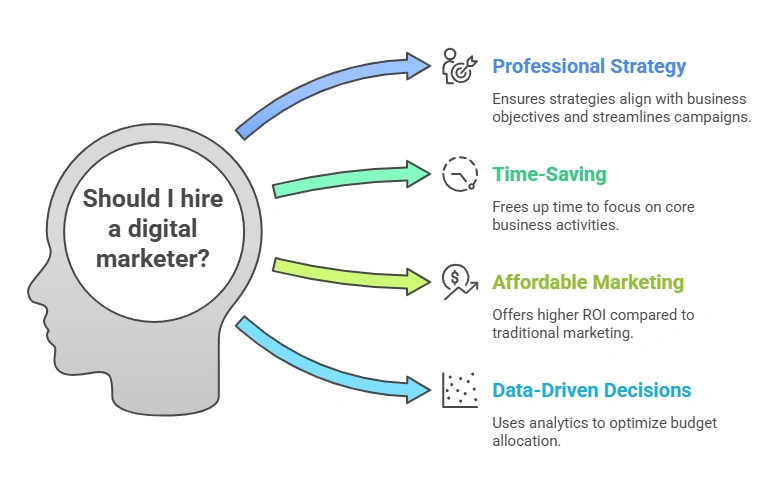
A professional digital marketer can help a business develop a successful online strategy, beat the competition, and deliver measurable results across many digital channels.
Here are some reasons why it is important to invest in the right marketing expert.
- Professional strategy execution: A digital marketer will be able to create strategies that will be aligned with the objectives of your business. They are aware of the platforms to focus on and how to streamline campaigns to achieve improved outcomes.
- Time-saving: It may require hours a day to manage social media, search engine optimization, content marketing, and paid advertisements. A digital marketer enables you to concentrate on core business activities.
- Affordable marketing: Although employing a professional comes at a fee, digital marketing is affordable in the long term, and it has a higher ROI than traditional marketing.
- Data-focused decisions: A digital marketer will track the performance of the campaign using analytics so that your budget is spent on the channels that perform well.
Factors affecting digital marketing costs
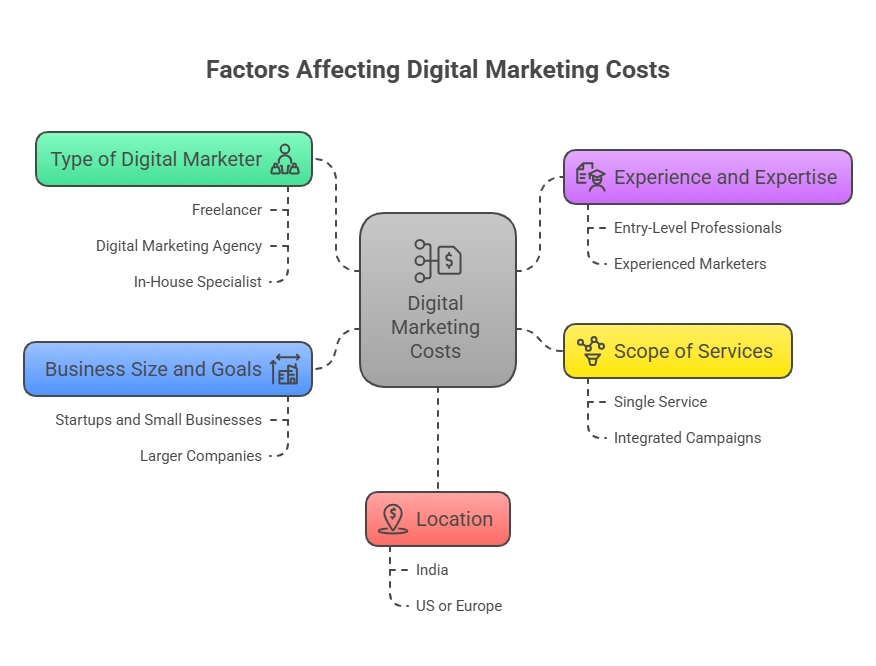
The cost of digital marketing can be totally different depending on business goals, service needs, project complexity, and the marketer’s experience level.
Below are the key factors that impact the pricing of digital marketing services.
1. Type of digital marketer
- Freelancer: Usually charges less, suitable for small projects.
- Digital marketing agency: Offers comprehensive services but can be more expensive.
- In-house specialist: Costs include salary, benefits, and software tools.
2. Experience and expertise
- Entry-level professionals may charge less but provide limited expertise.
- Experienced marketers or SEO specialists, PPC, or social media demand higher fees.
3. Scope of services
- A single service like SEO or social media marketing costs less than a full-service package.
- Integrated campaigns covering SEO, PPC, content marketing, and email campaigns increase digital marketing costs.
4. Business size and goals
- Startups and small businesses can opt for cost-effective digital marketing strategies.
- Larger companies with extensive campaigns will require higher investment.
5. Location
- Digital marketing cost in India is often lower than in the US or Europe.
- Costs vary depending on regional expertise and market demand.
Looking for an Affordable Digital Marketing Team?
SEO Discovery offers flexible plans that fit every budget.
Typical pricing models for digital marketing
Understanding digital marketing agency cost and other pricing models is crucial for budgeting:
Pricing Model | Description | Typical Cost / Notes |
Hourly Rate | Freelancers or consultants may charge based on expertise. Good for small or short-term projects. | $15 to $100+ per hour |
Monthly Retainer | Common for ongoing campaigns. | $500 to $5,000+ per month, depending on services and agency reputation |
Project-Based | Fixed pricing for a specific campaign or project. Ideal for businesses with a limited budget or one-off campaigns. | Varies per project |
Performance-Based | Payment based on results, such as leads generated or sales achieved. Helps ensure ROI but may involve higher initial fees. | Varies depending on goals and outcomes |
Average costs of digital marketing services
Here’s a breakdown of the digital marketing services costs for different service types:
1. SEO services
- Cost for digital marketing via SEO ranges from $300 to $2,000 per month.
- Includes on page optimization, link building, content creation, and analytics.
2. Social media marketing
- Average cost: $400 to $5,000 per month.
- Pricing depends on platforms, posting frequency, and ad spend.
3. Pay-per-click advertising (PPC)
- Cost depends on ad spend and management fees.
- Agencies often charge 10–20% of ad spend as a management fee.
4. Email marketing
- Can range from $200 to $1,000 per month, depending on list size and campaign frequency.
5. Content marketing
- The average digital marketing cost for a small business ranges from $500 to $4,000 monthly.
- Includes blogs, articles, infographics, and videos.
How to make digital marketing cost-effective?
Proper management of digital marketing costs and hiring a digital marketing expert can help businesses save money, improve the results of their campaigns, and get better value from their marketing investment.
Here are some key points that can help make digital marketing more cost-effective.
- Set clear goals: Know what you want to achieve, such as brand awareness, leads, or sales.
- Prioritize high-ROI channels: Focus on platforms that generate the most engagement and conversions.
- Leverage freelancers and agencies smartly: Mix freelancers for specific tasks and agencies for strategy and campaigns.
- Use analytics to optimize: Track performance regularly to cut low-performing campaigns and cut digital marketing costs.
- Invest in adaptable tools: Automation and software tools help save time and money.
Comparing Costs: Freelancer vs Agency vs In-House
Type | Cost | Pros | Cons |
Freelancer | $15–$100/hr | Flexible, cheaper | Limited bandwidth, less support |
Agency | $500–$5,000/mo | Full-service, expert team | Higher upfront cost |
In-House | $1,500–$4,000/mo + benefits | Dedicated, focused on brand | Salary, software, and training |
Digital marketing costs in India
India is becoming a hub for affordable digital marketing services. Some advantages include:
- Lower labor costs compared to Western countries
- Access to skilled professionals and agencies
- Cost-efficient strategies for startups and small businesses
Typical digital marketing cost in India:
- Freelancers: Rs. 10,000–Rs. 50,000+ per month
- Agencies: Rs. 15,000– Rs. 70,000+ per month
- In-house: Rs 40,000– Rs 100,000 per month + benefits
Despite the lower cost, businesses can still get cost-effective digital marketing results comparable to international standards.
How we delivered better ROI for a client
We helped one of the ecommerce clients who was struggling with high digital marketing costs and low online visibility. They were spending a lot and getting very little return, with no steady traffic, weak brand presence, and no clear idea of what was working.
We took over their digital marketing, and we worked on SEO and social media campaigns. We built a strong SEO foundation to improve search rankings and visibility, and we implemented targeted social media campaigns to raise brand awareness. We tracked every expense and used data to make our decisions. Within months, they had better visibility, higher brand recall, and much higher ROI, at a lower cost.
SEO performance results (Last 6 months vs. previous 6 months):
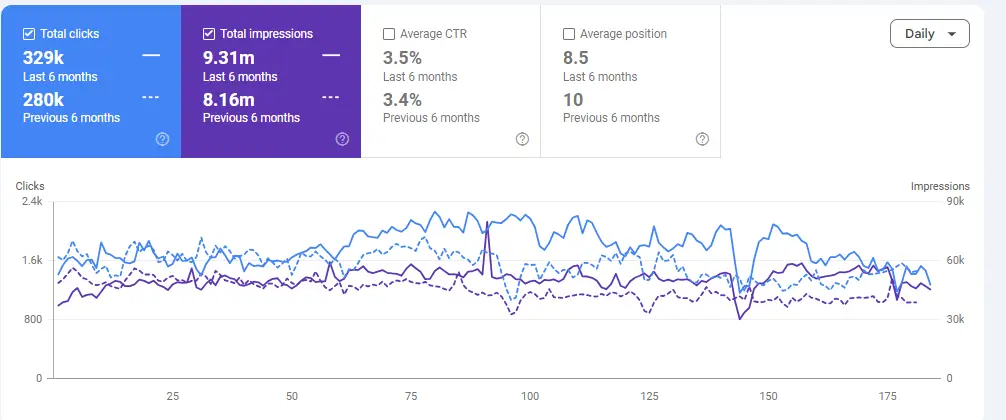
- Total clicks grew from 280K to 329K, a significant organic traffic increase.
- Total impressions reached 9.31M, up from 8.16M in the previous period.
- Average CTR improved to 3.5%, reflecting stronger content relevance.
- Average position improved to 8.5, moving closer to Page 1 dominance.
Brand awareness and social media results:
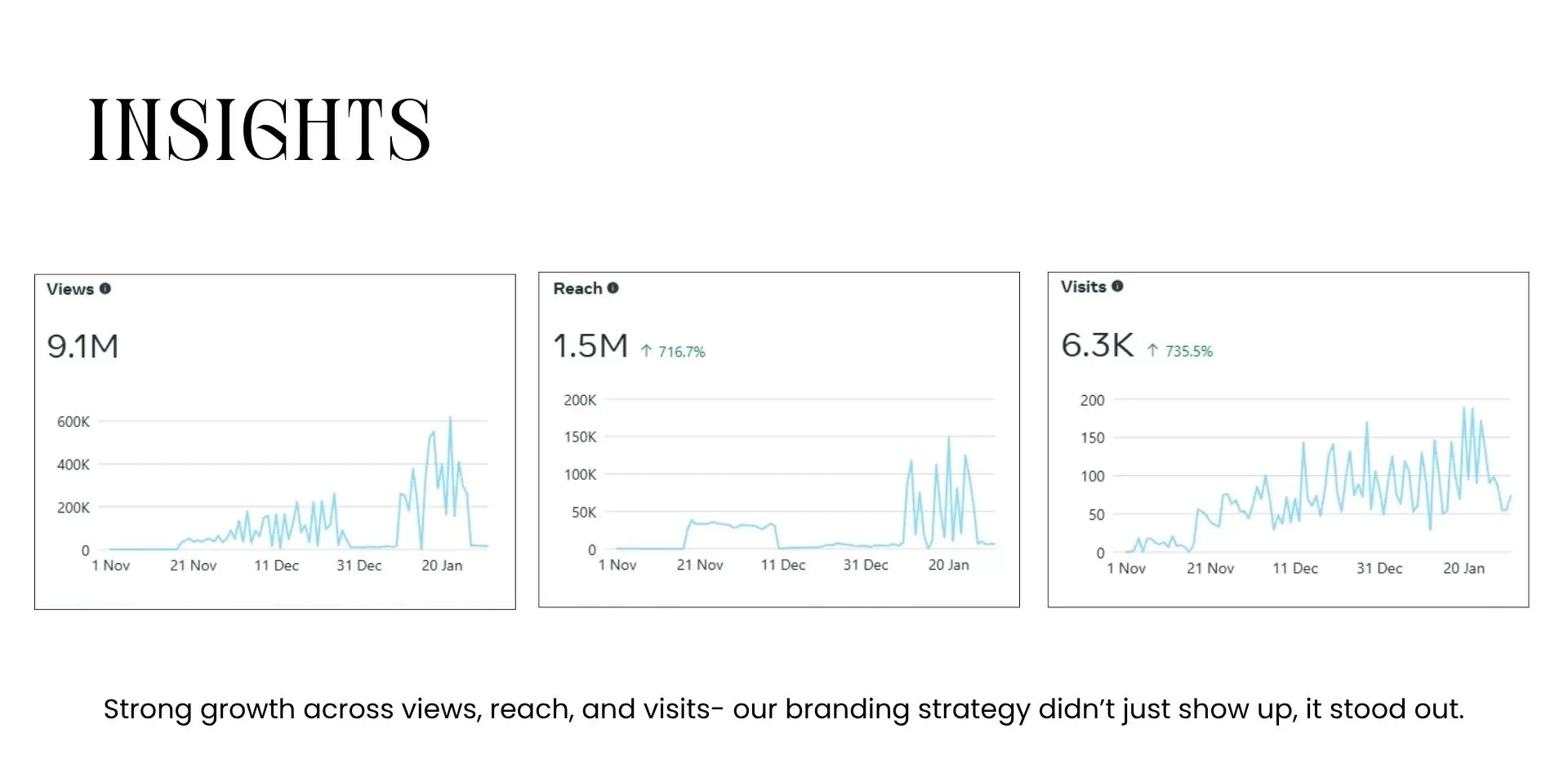
- Content views surged to 9.1M across targeted platforms.
- Audience reach grew to 1.5M with a remarkable 116.7% growth rate.
- Profile visits reached 6.3K with a 750.6% increase, signaling strong brand recall.
How SEO Discovery can help you save on digital marketing costs
Understanding how much digital marketing costs is just one part of running successful online campaigns. Choosing the right partner can significantly impact your overall expenses and ROI. SEO Discovery, the best digital marketing agency, specializes in providing cost-effective digital marketing solutions tailored to your business needs.
With SEO Discovery, businesses can access expert services without the high overhead of hiring digital marketers. Our team handles everything from SEO, social media marketing, and PPC services to content marketing, ensuring your campaigns are efficient and results-oriented.
Some ways SEO Discovery helps control digital marketing costs include the following:
- Customized packages: Pay only for the services your business needs with our flexible digital marketing packages, avoiding unnecessary expenses.
- Efficient campaign management: Reduce wasted ad spend with optimized strategies.
- Analytics and reporting: Track results to focus on high-performing channels, helping you cut digital marketing costs.
- Expert guidance: Save time and resources by leveraging proven techniques instead of trial-and-error marketing.
Contact us today and grow revenue with proven digital marketing solutions.
Struggling to Grow Your Business Online?
We deliver results through proven digital marketing services.
FAQs about how much it costs to hire a digital marketer
Depending on the experience, skills, and type of professional you hire, hiring a digital marketer will cost you. Freelancers can charge between 15-100 dollars an hour; agencies, 500-5000 dollars a month; and in-house specialists, 1500-4000 dollars a month, with benefits.
Digital marketing pricing in India varies based on expertise and service model. Freelancers in digital marketing in India charge Rs. 10,000 to Rs. 50,000+ a month, agencies charge Rs. 25,000 to Rs. 70,000+ a month, and in-house teams charge Rs. 40,000 to Rs. 1 lakh+ a month plus benefits.
The type of marketer (freelancer, agency, or in-house), experience, services required (SEO, PPC, social media), business size, and location are factors. The price of digital marketing in India is usually lower compared to that of the western countries.
Yes. Digital marketing is cost-effective even for startups and small businesses since they can concentrate on high-ROI channels such as SEO, social media, and email marketing.
Absolutely. Establish specific objectives, focus on the most effective channels, measure the campaigns using analytics, and use freelancers or agencies to perform a particular task to reduce the digital marketing expenses.
SEO Discovery offers comprehensive online marketing that encompasses SEO, social media marketing, PPC services, content marketing, and analytics to assist companies in expanding online effectively.
SEO Discovery can help you reduce digital marketing expenses through flexible digital marketing packages, streamlined campaigns, and analytics-based approaches, so you only pay for the services your business requires.
Yes. SEO Discovery provides affordable digital marketing solutions tailored to startups, small businesses, and large companies, and makes sure that they are not overspending on marketing.
You may schedule a free consultation or call to talk about your business objectives. SEO Discovery will recommend the appropriate digital marketing package and strategy to suit your budget and development goals.