


Objective: The goal of this blog is to help developers, businesses, and website owners understand the SEO problems with Angular websites and show simple ways to fix them. It explains how to make Angular apps easier for Google to find and rank, using methods like server-side rendering, pre-rendering, and better meta tags. It also highlights how SEO Discovery can help improve your site’s visibility and traffic.
Angular is a front-end framework that is used in developing fast, dynamic and interactive web applications. It is particularly well-liked in single-page applications (SPAs) where the content is loaded dynamically and the page is not refreshed. This provides an easy user experience but it also poses a problem to SEO. In contrast to other websites, Angular applications are highly dependent on JavaScript in displaying content, which may pose a challenge to search engine crawlers to access and index critical pages.
Most companies and developers believe that the creation of a well-performing Angular site is sufficient to achieve good ranking on Google. But even the most perfectly created Angular site can be invisible in the search results without an adequate SEO configuration. This may affect your exposure, traffic and general online performance.
Did You Know? Google struggles to index JavaScript-heavy sites. Without server-side rendering, your Angular site’s content might not appear in search results.
Luckily, the problem of Angular SEO can be resolved through appropriate measures. Pre-rendering and server-side rendering (SSR) to the configuration of metadata and the optimization of URLs, there are a number of strategies that can be used to make Angular apps more search-engine friendly.
This blog will take a look at the typical SEO problems in Angular projects and how to solve them in an efficient way – to help you optimize your SEO and increase your organic traffic, whether you’re working with an in-house team or partnering with the best SEO agency for support.
Key Takeaways
- Use Angular Universal or Pre-rendering to make your content visible to search engines and improve loading speed.
- Set up dynamic meta tags and clean URLs to help Google understand and rank your pages better.
- Add structured data and run regular SEO audits to catch and fix issues like broken links or missing tags.
- Get expert help from SEO Discovery to fully optimize your Angular site for better visibility and traffic.
Table Of Contents
- How to Make Angular SEO Friendly
- Is Angular Good for SEO?
- Is Angular SEO Friendly?
- What is SEO in Angular?
- Common Angular SEO Issues and How to Fix Them
- Angular SEO Best Practices
- Tools and Libraries to Improve Angular SEO
- Monitoring and Maintaining Angular SEO
- Why Choose SEO Discovery for Angular SEO Optimization?
- FAQs About How to Fix Angular SEO Issues
How to Make Angular SEO Friendly
The process of making your Angular site SEO friendly is about filling the gap between JavaScript-based front-end and search engine crawlers needs. Angular applications by default render content on the client side, which may not be easy to index by the search engines. To address this, the developers should use some methods that make the content available to the users and search engine robots.
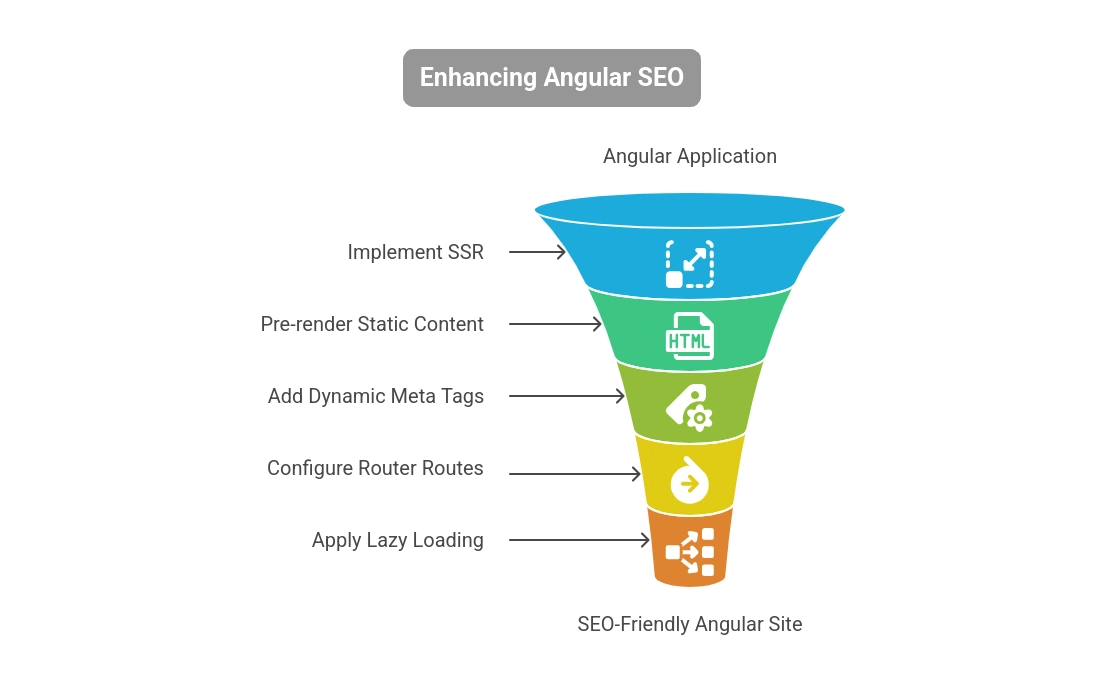
1. Server-Side Rendering (SSR)
Angular Universal is the best solution to Angular to make it SEO friendly since it offers server-side rendering (SSR). Using SSR, the content is served on the server and delivered to the browser as a complete HTML page, which is simpler to crawl and index by search engines.
Benefits of SSR include:
- Faster initial load times
- Improved crawlability
- Better user experience on slow connectionssEnhanced social media sharing previews
2. Implement Pre-rendering
If your app is primarily static content then pre-rendering is probably a better option. This technique creates static HTML pages for each route at build time, so these pages are immediately accessible to search engines.
Things like @angular/platform-server and Scully can also help with SSR or pre-rendering.
3. Add Dynamic Meta Tags
Meta tags (title, description, og:title, og:image, etc) are very important for Angular SEO optimization and should be crafted carefully — often with the support of professional content writing services to ensure clarity, relevance, and keyword targeting. Use Angular’s Meta and Title services from @angular/platform-browser to dynamically change meta tags according to the page content.
4. Angular Router Routes Configuration
Do not use hash-based routing (/#/route) and use HTML5 pushState routing instead. Clean URLs are friendlier and more indexed by the search engines.
5. Apply Lazy Loading with Caution
Although lazy loading in Angular is performance-enhancing, loading feature modules as needed, it can negatively affect SEO unless used properly. Lazy-loaded content may not be found by search engines. SSR alleviates this by serving lazy-loaded routes on the server.
Is Angular Good for SEO?
The question “is Angular good for SEO” is a bit complex. Out of the box, Angular isn’t SEO friendly due to client-side rendering. However, with the right tools and practices, especially when tailored for SEO for small businesses, Angular can be very effective.
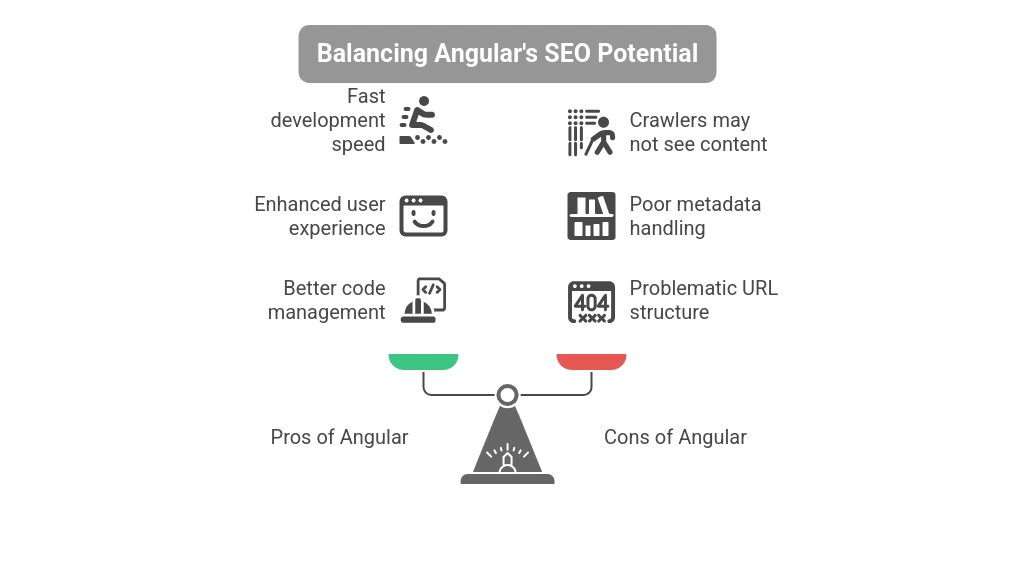
Pros of Angular for SEO:
- Fast development for complex applications
- Enhanced user experience
- Component-based architecture allows better code management
Cons (if not optimized):
- Crawlers may not see JavaScript-rendered content
- Poor metadata handling without additional setup
- URL structure can be problematic with default settings
With tools like Angular Universal, Scully, and proper routing/meta configuration, you can make Angular SEO competitive with traditional SSR frameworks.
Is Angular SEO Friendly?
In its default setup, Angular is not SEO friendly. This is primarily because Angular relies on JavaScript to load and render content, which many search engine bots (especially non-Google ones) struggle with.
However, with the implementation of SSR or pre-rendering, Angular can be made very SEO friendly. In fact, Angular SEO best practices can lead to websites that are fast, indexable, and provide excellent user experiences.
Checklist to Make Angular SEO Friendly:
- Use Angular Universal for SSR
- Add dynamic meta tags and structured data
- Create clean, descriptive URLs
- Use canonical tags to avoid duplicate content
- Implement sitemap.xml and robots.txt
- Ensure fast page load speeds
What is SEO in Angular?
What is SEO in Angular? It refers to optimizing Angular applications to be visible, accessible, and indexable by search engines. This involves adapting Angular’s JavaScript-heavy architecture to meet SEO standards.
Core Components of SEO in Angular:
1. Rendering Strategy
Use Angular SSR SEO with Angular Universal to serve pre-rendered content.
2. Meta Tag Management
Control and update title tags and meta descriptions dynamically using the Angular Meta service.
3. Sitemap and Robots.txt
These files help guide search engines through your app and define which pages should or shouldn’t be indexed.
4. Structured Data (Schema.org)
Enhance search listings with rich snippets by adding JSON-LD structured data to your Angular pages — including business info, reviews, and location details important for local SEO success.
5. Performance Optimization
- Minify JavaScript and CSS
- Use lazy loading wisely
- Compress images
Let Search Engines See Your Angular Content We Solve Visibility Issues with Smart Angular SEO Strategies!
Common Angular SEO Issues and How to Fix Them
Issue 1: Content Not Indexed
Cause: JavaScript rendering delays content
Fix: Use SSR or pre-rendering
Issue 2: Missing Meta Tags
Cause: Lack of server-rendered metadata
Fix: Use Angular’s Meta and Title services
Issue 3: Improper URL Structure
Cause: Hash-based routing
Fix: Use PathLocationStrategy with pushState
Issue 4: Lazy Loading Hurts SEO
Cause: Content is loaded on demand
Fix: Preload important routes or SSR
Angular SEO Best Practices
1. Apply Angular Universal
It is essential to large-scale apps that want to achieve good SEO scores. It supports server-side rendering, which makes pages load faster and guarantees that content is indexed by search engines more efficiently.
2. Clean URLs
Use keyword-rich slugs instead of query parameters — ideally based on solid keyword research — to improve both user readability and search visibility. Clean URLs are more readable to the user and search engines, which increases the likelihood of ranking high in the relevant search queries.
3. XML Sitemaps Create
Static routes can be done with dynamic sitemap generation or static. Sitemaps make it easier to have your pages indexed by the search engines and therefore all your important contents are accessible and ranked accordingly.
4. Googlebot optimization
Make sure your app can be crawled using tools such as Google Search Console and Lighthouse. Test HTML and render, correct crawl errors, and check index coverage to ensure optimum visibility and performance of search engines.
5. Canonical Tags
Avoid duplicate content issues by telling Google which version of the URL to use. This directs search engines to the original page and merges the link equity, which enhances SEO and prevents ranking penalties.
Tools and Libraries to Improve Angular SEO
- Angular Universal – For server-side rendering
- Scully – Static site generator for Angular
- Angular Meta and Title Services – For dynamic meta tags
- Preboot – To handle app transitions during SSR
- Google Search Console – For monitoring and fixing indexing issues
- Lighthouse – For measuring SEO performance
Monitoring and Maintaining Angular SEO
SEO Audits: SEO Audits: Conduct regular technical SEO audits using tools such as Ahrefs, SEMrush, or Screaming Frog to identify problems, such as broken links, missing metadata, or crawl errors. Checks will make your SEO technically sound.
Performance Monitoring: Run PageSpeed Insights or Lighthouse at regular intervals to maintain performance and loading time optimal. Sites that load quickly enhance user experience and decrease bounce rates and positively affect the overall ranking of the search engine.
Structured Data Testing: You can validate your structured data with Google Rich Results Test. This assists in the enrichment of search listing with rich snippets to increase the click-through rates and give search engines more context.
Why Choose SEO Discovery for Angular SEO Optimization?
Optimizing Angular applications for SEO can be complex — especially when balancing performance with visibility. That’s where SEO Discovery comes in. As a leading digital marketing agency with deep expertise in technical SEO and modern web frameworks, SEO Discovery specializes in helping businesses unlock the full search potential of their Angular-based websites.
What Makes SEO Discovery the Right Fit?
- Proven Experience with Angular Projects: Our team understands the unique challenges of client-side rendered frameworks and has helped multiple Angular-based businesses boost their visibility, crawlability, and rankings.
- Full-Stack SEO Expertise: As a specialized SEO consultancy, we handle everything from implementing Angular Universal for SSR to optimizing meta tags, sitemaps, and structured data, we cover every technical detail necessary to make your app SEO-ready.
- Performance-Centric Strategy: We ensure your site not only ranks well but also loads fast, provides smooth UX, and meets Core Web Vitals – key ranking signals for Google.
- Customized SEO Audits and Fixes: We conduct thorough Angular SEO audits using tools like Lighthouse, Screaming Frog, and Google Search Console to pinpoint critical issues and deliver actionable fixes.
- Affordable & Scalable Packages: Whether you run a small business SPA or a large-scale enterprise portal, we offer scalable SEO packages tailored to your needs and goals.
Ready to Make Your Angular Website SEO-Friendly? Let Us Handle the Technical Details While You Focus on Growth!
FAQs About How to Fix Angular SEO Issues
No, Angular is not SEO-friendly by default because it uses client-side rendering, which can prevent search engines from properly indexing content. However, with SSR or pre-rendering, it can be optimized effectively.
Angular Universal is a server-side rendering (SSR) solution that renders Angular applications on the server before delivering them to the client. It improves crawlability and ensures better SEO performance.
Yes, but only if properly optimized. Without SSR or pre-rendering, search engine bots may struggle to crawl and index Angular apps due to their reliance on JavaScript.
Use Angular Universal for SSR, set dynamic meta tags, avoid hash-based routing, implement clean URLs, generate sitemaps, and validate structured data. These steps bridge the gap between Angular and search engines.
SEO Discovery offers expert-level technical SEO services specifically for JavaScript frameworks like Angular. We understand the complexities and apply proven solutions like SSR, meta optimization, and performance audits.
We serve a wide range of industries including ecommerce, SaaS, healthcare, real estate, finance, and startups — helping each build SEO-optimized Angular websites tailored to their unique business goals.
Yes, SEO Discovery offers fully customizable and scalable SEO packages for Angular applications — whether it’s a simple SPA or a large enterprise platform — based on your business needs and budget.
You can contact us through our website for a free consultation. Our experts will analyze your Angular website and suggest a tailored SEO strategy to boost visibility and organic traffic.