

Objective: The objective of this blog is to explain what Interaction to Next Paint (INP) is, why it matters for SEO and user experience, how to identify and fix high INP scores, and how SEO Discovery can help optimize your website’s performance effectively.
The speed of a site does not only mean how quickly it loads but also how rapidly it reacts to a click, tap, or keystroke. Even a slight lag following a user action on your site can make the site feel sluggish and annoying, regardless of the rest of the page loading quickly.
Interaction to Next Paint (INP) comes in there. It is a web performance indicator proposed by Google to determine the responsiveness of a website when interacted with by a user. INP does not look at the first click or action only but looks at the whole interaction and identifies the slowest interaction. This assists developers to know the level of smoothness and responsiveness of their site to the users.
A good INP score should be under 200 milliseconds. Sites with INP above 500ms are considered poor performers and may experience lower rankings and higher bounce rates — especially on mobile.
When INP is high, it indicates that your site may take long to respond, and this may drive away users. But the positive is: INP can be enhanced through the right page speed optimization measures.
In this blog, we will discuss how INP works, why it is important, and easy, effective things that you can do to increase your INP and make your site faster and smoother — especially when working with the best SEO agency for performance optimization.
Key Takeaways
- INP measures responsiveness — it tracks how quickly your site reacts to user interactions like clicks or keystrokes, not just how fast it loads.
- A good INP score is under 200ms — anything above 500ms is considered poor and can hurt SEO and user experience.
- Common causes of high INP include heavy JavaScript, long main thread tasks, and bloated DOM elements — especially on WordPress or JavaScript-heavy sites.
- You can improve INP by optimizing scripts, using web workers, minimizing DOM complexity, and working with experts like SEO Discovery for safe, performance-driven fixes.
Table Of Contents
- What is Interaction to Next Paint?
- Why Does INP Matter for SEO and User Experience?
- How is Interaction to Next Paint Measured?
- What Causes a High INP Score?
- How Can You Test INP on Your Website?
- How to Improve Interaction to Next Paint?
- How Can WordPress Sites Improve INP?
- Is Interaction to Next Paint Part of Core Web Vitals?
- How Can I Improve INP Without Breaking the Site?
- Can a Slow INP Affect My Rankings?
- What Tools Help Monitor and Improve INP?
- How to Reduce INP in JavaScript-Heavy Applications?
- Improve INP with SEO Discovery – Your Partner in Performance Optimization
- FAQs About How to Improve Interaction to Next Paint
What is Interaction to Next Paint?
It is worth knowing what Interaction to Next Paint actually measures before you find out how to improve it. Interaction to Next Paint is a Core Web Vitals measure presented by Google. It is the amount of time that it takes a browser to be able to update the page visually after a user interaction (i.e. a button is clicked). It does not only emphasize loading speed but real world user experience.
In contrast to the earlier metrics which were based on the first input, INP (Interaction to Next Paint) takes into account all interactions on the part of a user during his/her visit. It then gives the maximum interaction delay, which gives a better picture of the responsiveness of your site in general.
Why Does INP Matter for SEO and User Experience?
Slow site responsiveness may annoy the users and increase bounce rates. When users feel that your site is not responding fast to their activities, they will be less likely to remain, convert or revisit.
Interaction to Next Paint SEO is getting critical, in terms of SEO. Google has also confirmed that INP is a replacement of First Input Delay (FID) as a Core Web Vital. Therefore, it has a direct effect on your rankings. The more responsive websites will tend to have higher SEO visibility and user interaction — an area where a trusted SEO consultancy can give you a measurable edge.
How is Interaction to Next Paint Measured?
Understanding Interaction to Next Paint thresholds is crucial to knowing whether your site needs improvement. Google has defined the following thresholds:
- Good: INP below 200 milliseconds
- Needs Improvement: INP between 200–500 milliseconds
- Poor: INP above 500 milliseconds
If your site falls into the “Needs Improvement” or “Poor” category, you need to take action to lower your INP score.
What Causes a High INP Score?
Several factors can affect your site’s responsiveness:
- Heavy JavaScript execution
- Long tasks blocking the main thread
- Poorly optimized third-party scripts
- Inefficient event handlers
- Layout shifts and DOM updates that take too long are often overlooked in on-page SEO, but they directly impact your site’s perceived responsiveness.
All these contribute to interaction delays that hurt the Google Interaction to Next Paint score. Identifying and fixing these issues is key.
How Can You Test INP on Your Website?
To run an Interaction to Next Paint test, you can use tools like:
- PageSpeed Insights
- Lighthouse (in Chrome DevTools)
- WebPageTest
- Chrome UX Report (CrUX)
- Real User Monitoring (RUM) tools
These tools will provide INP data and show what tasks are causing delays. This is a critical first step in any optimization strategy.
How to Improve Interaction to Next Paint?
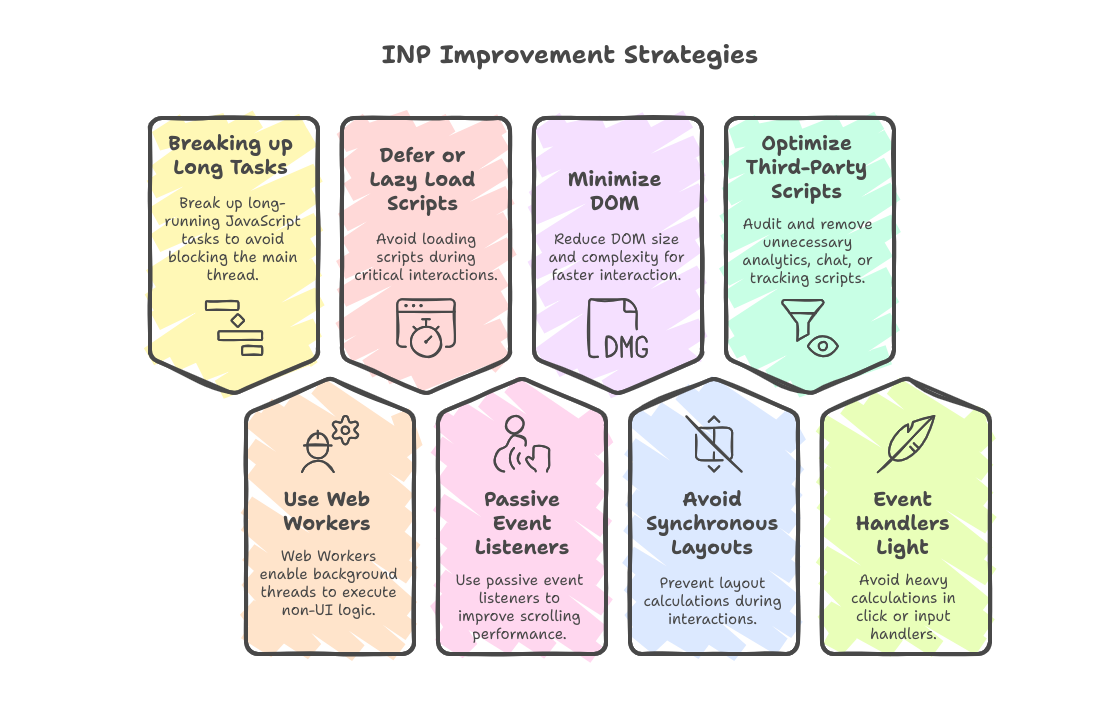
These are some proven strategies not just for improving INP, but for your broader Core Web Vitals optimization efforts as well.
Breaking up Long Tasks: Break up long-running JavaScript tasks so they do not block the main thread using techniques such as requestIdleCallback or setTimeout.
Use Web Workers: Web Workers allow background threads to execute any non-UI logic.
Defer or Lazy Load Scripts: Scripts are not supposed to be loaded where there is a critical interaction.
Passive Event Listeners: Use passive event listeners where possible to enhance the scrolling performance.
Minimize DOM: DOM size and complexity will be minimized to result in faster interaction.
Do not force Synchronous Layouts: Do not make layout calculations happen on an interaction.
Optimize Third-Party Scripts: Conduct an audit and eliminate unnecessary analytics, chat or tracking scripts.
Event Handlers Light: Do not do heavy calculations in click or input handlers.
Not Sure if Your INP Score is Hurting Your SEO? Run a Detailed Performance Check and Learn Exactly What Needs Fixing!
How Can WordPress Sites Improve INP?
If you use WordPress, there are specific steps to optimize Interaction to Next Paint WordPress performance:
- Choose a lightweight theme
- Minimize plugin usage
- Use performance-focused plugins like WP Rocket or LiteSpeed Cache
- Use lazy loading and defer JS execution
- Minimize DOM elements created by page builders
Many WordPress sites suffer from poor responsiveness due to plugin bloat and heavy builders.
Is Interaction to Next Paint Part of Core Web Vitals?
Yes, Interaction to Next Paint Core Web Vitals is a performance metric to replace First Input Delay. From March 2024, Google will treat INP as a standard Core Web Vital that will impact search rankings. It is vital that your site meets the suggested thresholds.
How Can I Improve INP Without Breaking the Site?
To optimize Interaction to Next Paint safely:
- Start by measuring and identifying bottlenecks using Lighthouse
- Prioritize fixes that affect the main thread execution
- Avoid drastic code changes without testing in staging
- Focus on user-triggered events like clicks and input fields
These incremental changes can significantly lower your INP Interaction to Next Paint score over time.
Can a Slow INP Affect My Rankings?
Yes. Page responsiveness is one of the ranking signals that Google has adopted. When INP score is high, the interaction feedback is slower which results in reduced engagement and increased bounce rates. It is a metric in Interaction to Next Paint Google which is directly related to your SEO and user satisfaction.
What Tools Help Monitor and Improve INP?
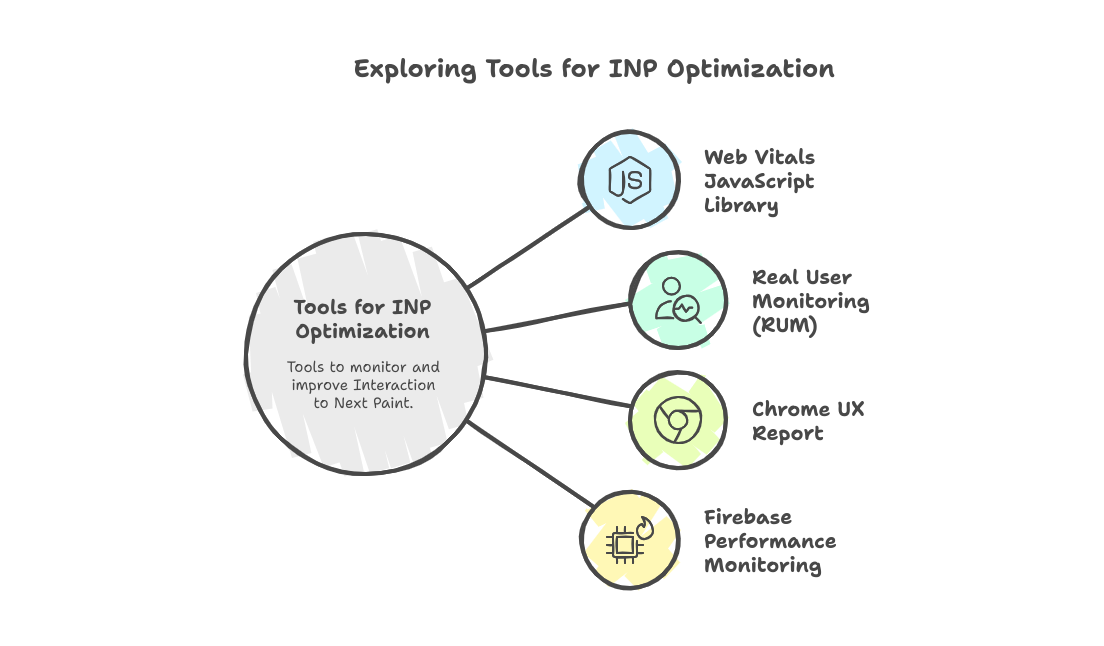
Besides PageSpeed Insights and Lighthouse, consider using:
- Web Vitals JavaScript Library
- Real User Monitoring (RUM)
- Chrome UX Report
- Firebase Performance Monitoring
These tools provide real-world data, which is more reliable than lab results. This helps you track and gradually optimize Interaction to Next Paint performance.
How to Reduce INP in JavaScript-Heavy Applications?
JavaScript-heavy apps like SPAs often suffer from poor INP. Here’s how to improve Interaction to Next Paint in such cases:
- Code-split routes and components
- Avoid unnecessary re-renders
- Use React.memo and useCallback
- Prioritize interactions using startTransition() in React 18+
These advanced techniques help maintain responsiveness during heavy interactivity.
Improve INP with SEO Discovery – Your Partner in Performance Optimization
Struggling to lower your INP score and boost your rankings? As a leading digital marketing agency, SEO Discovery specializes in enhancing website performance with proven techniques tailored for Core Web Vitals like Interaction to Next Paint (INP).
Whether you’re running a JavaScript-heavy application, an eCommerce site, or a WordPress blog, we combine technical fixes with strategic keyword research to improve both performance and visibility. Our team uses cutting-edge performance tools and AI-driven audits to identify and resolve key bottlenecks affecting your INP — all while aligning with your broader digital marketing goals.
What We Do:
- Conduct in-depth INP, Core Web Vitals, and technical SEO audits for holistic performance insights
- Optimize JavaScript execution and main thread performance
- Defer non-critical resources and streamline scripts
- Deliver custom fixes without affecting site stability
- Provide continuous monitoring with real user data
Let Our Experts Audit Your Site and Show You Exactly How We Can Speed Up Your Interactions and Boost Your Core Web Vitals!
FAQs About How to Improve Interaction to Next Paint
Interaction to Next Paint (INP) is a Core Web Vital introduced by Google to measure how quickly a website responds visually after a user interaction—like clicking a button or typing in a form. Instead of only tracking the first input, INP monitors all interactions during a user’s visit and reports the slowest one. A lower INP score means your website feels faster, smoother, and more responsive to users.
Common causes include heavy JavaScript execution, long main thread tasks, poorly optimized third-party scripts, and excessive DOM complexity. All of these create delays between a user’s action and the visual response.
Yes. INP officially replaced First Input Delay (FID) as a Core Web Vital in March 2024. A poor INP score can negatively impact your site’s SEO, visibility, and user retention.
Not always. Tools like PageSpeed Insights and Lighthouse can help you identify quick fixes. However, for deep optimization—especially in JavaScript-heavy or WordPress sites—a performance specialist or agency is recommended.
We perform a full Core Web Vitals audit, optimize JavaScript performance, defer non-essential scripts, reduce main thread blocking, and provide real-user monitoring (RUM) to continuously track improvements.
Absolutely. Our team takes a non-disruptive approach—testing every change in staging environments and implementing fixes without affecting your site’s design, layout, or functionality.
Yes. We specialize in WordPress, WooCommerce, Shopify, and other CMS/eCommerce platforms. We optimize themes, plugins, scripts, and reduce DOM bloat to improve INP and overall performance.
It’s simple. Book a free consultation with our performance experts. We’ll audit your site, identify bottlenecks, and create a personalized plan to improve your INP and search rankings.